Most people meet system design as a list of boxes to memorise: load balancer, cache, queue, database, CDN. The list is easy to learn and almost useless on its own, because it hides the one thing that makes the discipline work. Every box exists because something broke. A server fell over, a query took four seconds, users were logged out for no reason, and the fix for that problem created the next one.
This article teaches system design that way. It grows one photo-sharing app from a single server into a service that can handle millions of users. Each part starts with something failing, introduces the component that fixes it, and then looks honestly at the new problem that component creates. Along the way there are five architecture diagrams with real tool logos and numbered request flows, and six small Python demos that were run before publishing, so every number quoted from them is a real result.
You do not need prior system design knowledge. Basic familiarity with web apps and databases is enough. The tools named here (NGINX, Docker, Redis, PostgreSQL, RabbitMQ, Kafka, Kubernetes, Prometheus, Grafana) are common, widely used choices, but the ideas apply to any stack.
The running example: a photo-sharing app
Imagine an app like Instagram, much smaller at the start. People sign up, upload photos, follow each other, and scroll a feed of recent photos from the people they follow. That is all. Five lines of product description, and yet it contains almost every classic design problem: storing files, serving a feed fast, handling traffic spikes, keeping data safe, and knowing when something is wrong.
Keep this app in mind. Every concept below is tied to it, and the last part assembles the whole thing in one diagram.
Part 1: What system design actually is
System design is deciding which components a system needs, how they connect, and what each one is responsible for, so that the system meets its goals at the scale you expect. Notice the two clauses that do the work: goals and scale expected. A design is never good in the abstract. It is good for a particular load, a particular budget and a particular tolerance for failure.
Three habits separate good designers from people who memorised diagrams:
- They ask questions before drawing. Who are the users, how many, and what do they do most often?
- They reason in trade-offs. Every choice buys something and costs something. Caching buys speed and costs freshness. Replication buys availability and costs consistency. There is no free option.
- They name the failure. For every box on the diagram they can say what happens when it dies.
High-level design and low-level design
Two phrases come up constantly. High-level design (HLD) is the architecture: services, databases, queues, how they talk, where data lives. Low-level design (LLD) is the code structure inside one component: classes, interfaces, method signatures, the schema of one table. HLD answers “what are the parts and how do they fit”. LLD answers “how is one part built”.
This article lives at the HLD level. When you design the photo app you decide that uploads go to object storage and a worker resizes them. You do not decide what the worker’s classes are called.
Real world: an architect drawing a hospital decides where the emergency wing, the pharmacy and the operating theatres go and how patients move between them. That is HLD. An electrician deciding which gauge of wire goes in which wall is LLD. Mixing the two levels in one conversation is how meetings go in circles.
Answer at the right altitude
A habit worth building early, and one that interviewers watch for: match the altitude of your answer to the question. If someone asks “how would you design a photo app”, an answer that opens with the index type on the likes table is too low. An answer that says “a distributed, scalable, microservice-based platform” and stops is too high. Start with users and requirements, sketch the main path, and go deeper only where the conversation pulls you.
Part 2: Requirements before boxes
The first mistake beginners make is to start drawing. The first thing a good designer does is ask what the system must do and how well.
Functional and non-functional requirements
Functional requirements are the features: sign up, upload a photo, follow a user, see a feed, like a photo. They describe what the system does.
Non-functional requirements are the qualities: how fast, how available, how durable, how scalable, how expensive. They describe how well it does it. Two systems can have identical features and completely different designs because their non-functional requirements differ.
| Quality | The question it answers | Example target for the photo app |
|---|---|---|
| Latency | How long does one request take? | Feed loads in under 300 ms for most users |
| Scalability | Can it handle ten times the users? | Add servers, not rewrite code |
| Availability | What share of the time is it up? | 99.9% (about 8.8 hours of downtime a year) |
| Durability | Can data be lost? | An uploaded photo is never lost |
| Cost | What is the budget? | Storage and bandwidth must stay affordable |
Notice that these pull against each other. Lower latency usually costs more. Higher availability needs more copies of everything. The design is the compromise you choose on purpose.
Five questions before any box
Requirements gathering boils down to five questions, and they work for almost any system:
- Who are the users, and how many? Thousands or hundreds of millions changes everything.
- What is the read to write balance? A photo app is overwhelmingly read-heavy: many more people look at photos than upload them.
- How durable must the data be? A lost like is a shrug. A lost photo is a lost memory. A lost payment is a lawsuit.
- How fast must it feel? The target latency decides whether you need caching and a CDN.
- What is the budget? A design you cannot afford is not a design.
Real world: a school’s internal marks portal and a photo app are both “web apps with a database”. The portal has 800 users who use it twice a term, so one server and nightly backups are plenty. The photo app has millions of users who open it daily. Same technology, completely different design, and the only thing that told you so was the five questions.
Requirements for our app
For the rest of the article, the photo app’s targets are these. They are assumptions, written down so that every later decision can point back to them.
| Requirement | Target |
|---|---|
| Daily active users | 10 million |
| Uploads | One per five active users per day |
| Photo views | 60 per active user per day |
| Feed latency | Under 300 ms for most requests |
| Availability | 99.9% for browsing, uploads may degrade briefly |
| Durability | Uploaded photos are never lost |
Part 11 turns these into real numbers and shows that the read to write ratio is 300 to 1. That single ratio shapes half the design.
Interview angle: the first five minutes
In a system design interview, the first five minutes decide the rest. Spend them on scope: ask the five questions out loud, write down two or three numbers, and state what you will leave out. Candidates who start drawing immediately look busy. Candidates who ask good questions look senior. The numbers do not need to be exact; they need to exist.
Part 3: The first version, one server
Every system starts small, and it should. A single server running the web app and the database is a perfectly good first design. It is simple to build, simple to debug and cheap. The mistake is not starting here; the mistake is not knowing what will break first.
Monolith or microservices
The first architecture decision is how to package the code. A monolith is one deployable application containing all features. Microservices split features into separate services (users, photos, feed, notifications) that communicate over the network.
| Monolith | Microservices | |
|---|---|---|
| Deployment | One unit, simple | Many units, needs automation |
| Development speed early on | Fast, one codebase | Slower, contracts between services |
| Scaling | Scale everything together | Scale each service on its own |
| Failure | One bug can take down everything | Failures can be contained |
| Operational cost | Low | High: more services to deploy, monitor and secure |
| Best for | Small teams, early product | Large teams, clear service boundaries |
The honest advice for a beginner design is to start with a well-structured monolith. Splitting a system into services before you understand where the boundaries are usually produces a distributed monolith: all the complexity of a network and none of the independence. Split when a specific pain demands it, such as one component needing to scale very differently from the rest.
Real world: many well-known products ran as monoliths for years while growing to enormous scale, and split out services only where a measured bottleneck justified it. The order matters: measure, then split.
Vertical and horizontal scaling
The single server gets slow as users arrive. There are two ways to add capacity.
Vertical scaling (scale up) means a bigger machine: more CPU, more RAM, faster disks. Horizontal scaling (scale out) means more machines doing the same job.
| Vertical | Horizontal | |
|---|---|---|
| How | Buy a bigger server | Add more servers |
| Complexity | None, the code does not change | Needs a load balancer and stateless design |
| Ceiling | Hard limit: the biggest machine you can buy | Very high |
| Cost curve | Gets steep at the top | Roughly linear |
| Failure | One machine is a single point of failure | Losing one machine is survivable |
| Downtime to scale | Often a restart | None |
Vertical scaling is the right first move because it is so simple. It stops being enough for three reasons: there is a ceiling, the price per unit of capacity climbs sharply, and a bigger server is still a single server, so when it dies everything dies.
Interview angle: why not just buy a bigger server?
A favourite interview question, and the answer has three parts. A bigger server has a ceiling. It remains a single point of failure. And it does nothing for latency across geography, because users in Sydney are still far from a server in Mumbai. Then add the nuance that earns respect: vertical scaling is often the correct first step, because it is cheap in engineering effort, and databases in particular are often scaled up before they are scaled out.
How a request actually travels
Before adding components, it helps to know what one request already involves, because every added box sits somewhere on this path. When a user opens the photo app:
sequenceDiagram
  participant B as Browser
  participant D as DNS
  participant S as Server
  B->>D: Where is photos.example.com?
  D-->>B: 203.0.113.10
  B->>S: TCP connect, then TLS handshake
  S-->>B: Certificate, encrypted channel ready
  B->>S: HTTPS GET /feed
  S-->>B: 200 OK with the feed JSON
- DNS turns the name into an IP address. The answer is cached by the browser, the operating system and the resolver, which is why the first visit is slower than the rest.
- TCP opens a connection: a round trip to agree on starting sequence numbers.
- TLS negotiates encryption and proves the server’s identity with a certificate: one or two more round trips.
- HTTP finally carries the request and the response.
Each round trip costs the physical distance between the user and the server. Light in fibre covers roughly 200 kilometres per millisecond, so a round trip between India and the United States typically takes 200 ms or more before any code runs. That is why distance matters, and why CDNs and regional deployments exist.
A few orders of magnitude are worth carrying in your head, because they explain most design decisions:
| Operation | Rough time |
|---|---|
| Read from memory | 100 nanoseconds |
| Read from an SSD | 0.1 milliseconds |
| Round trip inside one data centre | 0.5 milliseconds |
| Round trip between continents | 150 milliseconds or more |
Memory is thousands of times faster than a network hop, and a network hop is far faster than crossing an ocean. Caching exists because of the first gap, and CDNs exist because of the second.
Real world: you type a web address and see the page in under a second, yet the browser did a DNS lookup, a TCP handshake, a TLS handshake and an HTTP request, possibly through a CDN and a load balancer, before a single byte of the page arrived. The system is doing a great deal of work you never see.
Part 4: Load balancers and stateless services
The failure: the app is popular now and the single server is at 95% CPU every evening. You add a second server. Now a new problem appears immediately: how does a user’s request decide which server to go to?
The load balancer
A load balancer sits in front of the servers and spreads incoming requests across them. To the user there is one address. Behind it there are many servers, and the user never knows which one answered.
Technically a load balancer is a reverse proxy: it accepts requests on behalf of the servers behind it. That position gives it several jobs beyond spreading load:
- Health checks. It probes each server (for example, requesting
/healthzevery few seconds) and stops sending traffic to any that fail. This is what turns “a server died” from an outage into a non-event. - TLS termination. It handles the encryption once, so the app servers do not have to.
- Connection management. It keeps long-lived connections to clients and short, efficient ones to the servers.
- A place for protection. Rate limiting, request size limits and basic filtering naturally live here.
How it chooses a server
| Algorithm | How it picks | Good for | Watch out |
|---|---|---|---|
| Round robin | Each server in turn | Similar servers, similar requests | Ignores how busy each server is |
| Least connections | The server with fewest active connections | Requests of uneven length | Slightly more bookkeeping |
| IP hash | Hash of the client address | Keeping a client on one server | Uneven spread; breaks when servers change |
| Weighted | Proportional to a weight per server | Mixed server sizes | Weights need tuning |
Layer 4 and layer 7
A layer 4 load balancer works at the connection level: it forwards TCP streams without looking inside. It is very fast and protocol-agnostic. A layer 7 load balancer understands HTTP: it can route /api/* to one group of servers and /images/* to another, add headers, and make decisions based on cookies. NGINX and HAProxy do layer 7 routinely. Cloud providers offer both kinds as managed services.
Who balances the balancer?
Here is the catch. You removed the single point of failure from the app servers and created a new one: the load balancer itself. The standard fix is a pair: an active balancer and a standby that share a floating IP address and watch each other with heartbeats. If the active one stops answering, the standby takes over the address. Managed cloud load balancers do this for you, spread across zones, which is one reason they are popular.
A small working example
A first experiment worth running is two containers behind NGINX. This is the shape of it, small enough to read in a minute:
# docker-compose.yml
services:
  app1:
    image: myorg/photo-app:1.0
    environment: { INSTANCE: app1 }
  app2:
    image: myorg/photo-app:1.0
    environment: { INSTANCE: app2 }
  lb:
    image: nginx:stable
    ports: ["8080:80"]
    volumes: ["./nginx.conf:/etc/nginx/nginx.conf:ro"]
    depends_on: [app1, app2]
# nginx.conf
events {}
http {
upstream photo_app {
least_conn;
server app1:3000 max_fails=2 fail_timeout=10s;
server app2:3000 max_fails=2 fail_timeout=10s;
}
server {
listen 80;
location / {
proxy_pass http://photo_app;
proxy_next_upstream error timeout http_502 http_503;
proxy_connect_timeout 2s;
proxy_read_timeout 5s;
}
}
}Stop one container and refresh the page: NGINX marks it failed after two errors, and every request lands on the survivor. That is the whole idea, working. The proxy_next_upstream line retries a failed request on the other server, and the two timeouts make sure a slow server cannot hold a request forever. Both of those ideas return in Part 10.
The hidden problem: state
Once two servers exist, a quieter problem appears. Suppose a user logs in on server A, and server A remembers the login in its own memory. The next request goes to server B, which has never heard of this user. The app shows the login page again. To the user it looks like they were randomly logged out.
This is the difference between stateless and stateful.
- A stateful server remembers things between requests (a session in local memory, an uploaded file on local disk).
- A stateless server keeps nothing between requests. Everything it needs arrives with the request or comes from a shared store.
There are two fixes:
| Fix | How | Trade-off |
|---|---|---|
| Sticky sessions | The balancer always sends a user to the same server (cookie or IP hash) | Quick, but load spreads unevenly, and if that server dies the user loses their session |
| Central session store | Sessions live in Redis; any server can read any session | One more component, but servers become interchangeable |
The second is the real answer. Moving state out of the app servers into a shared store makes them stateless, and stateless servers are the foundation of horizontal scaling: you can add, remove or replace any of them at will.
Real world: a shop with one cashier who keeps your order in his head works fine until you hire a second cashier. Now you need the order written on a slip both can read. The slip is the shared session store.
Interview angle: the random-logout question
“Users are randomly logged out after we added a second server. Why?” The answer: sessions are stored in server memory, and the load balancer is sending requests to different servers. Offer both fixes, say which you prefer and why (central store, because it keeps servers disposable), and mention the follow-on: if sessions live in Redis, then Redis is now something that must not be a single point of failure either.
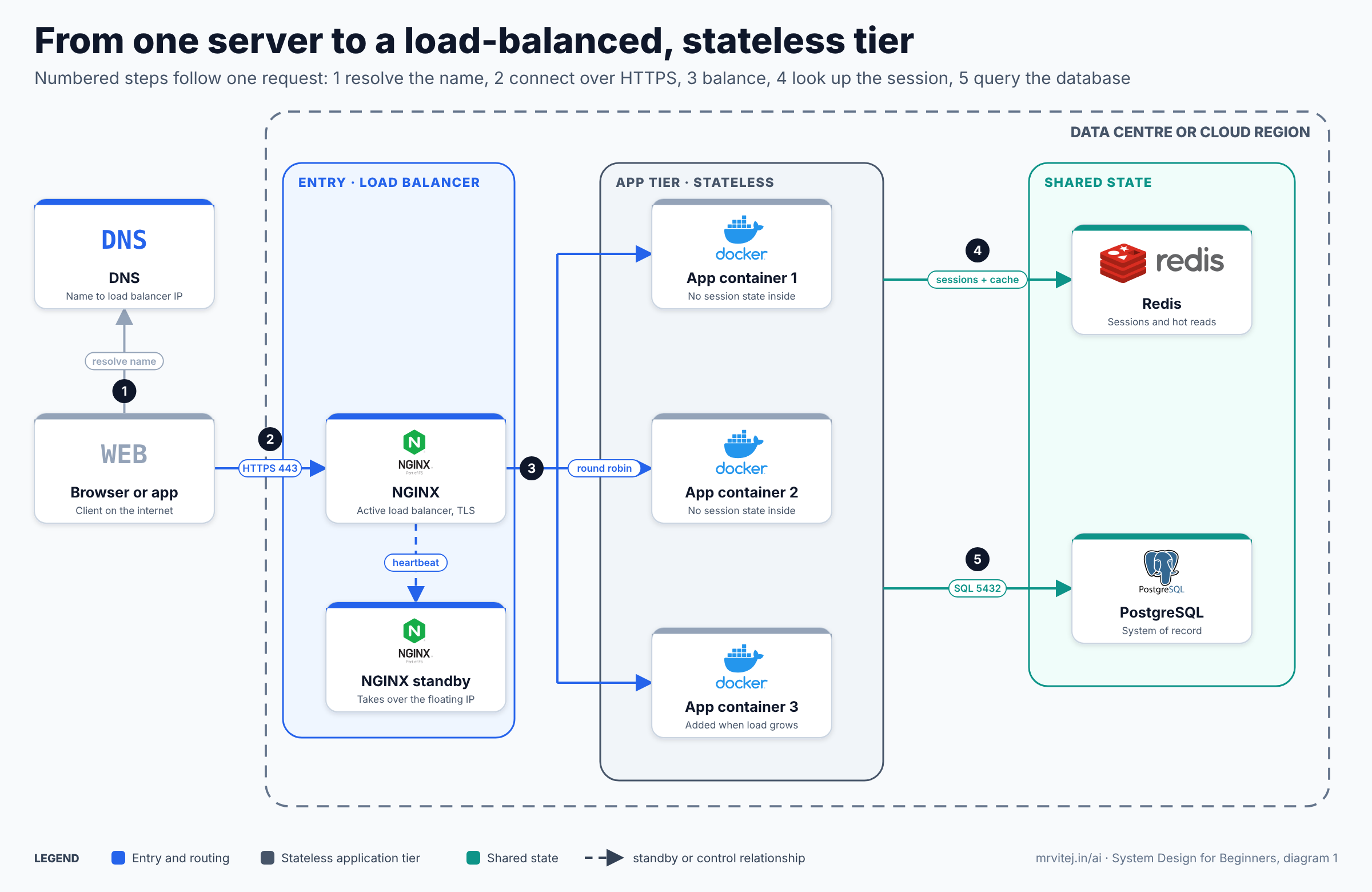
Diagram 1: a load-balanced, stateless tier. Open the zoomable diagram (scroll or pinch to zoom, drag to pan), or download it as SVG or PNG.
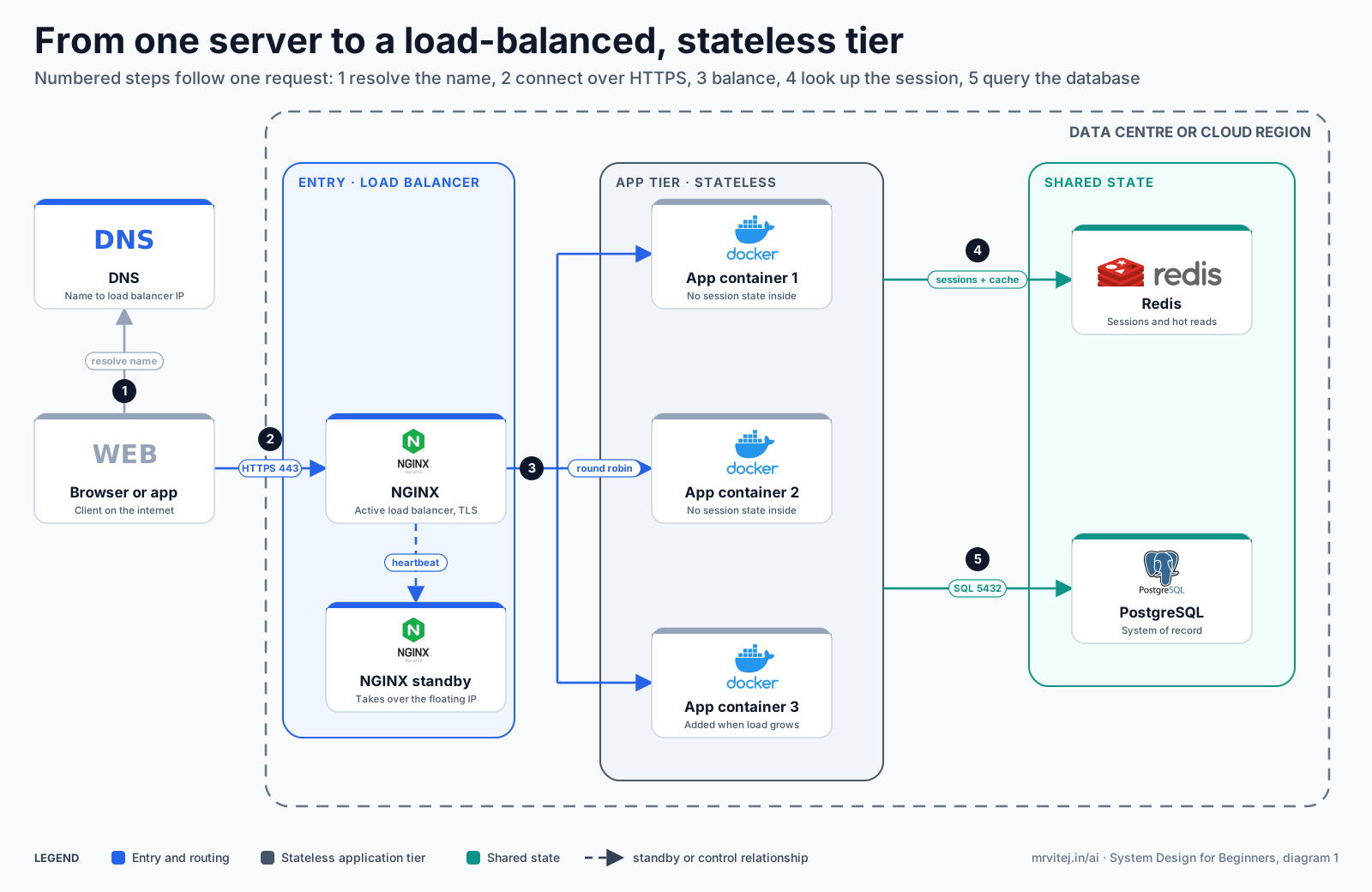
The diagram shows the result of this part: DNS resolves the name, an active NGINX balancer with a standby takes the HTTPS connection, requests are spread round robin over three stateless Docker containers, and all three share Redis for sessions and PostgreSQL for data.
Part 5: Data, reads and writes
The failure: the app servers are fine, but the feed page takes four seconds. Every server is waiting on the database. The bottleneck has moved.
Model data around how it is accessed
Data modelling is deciding what you store and how it is organised. The beginner instinct is to ask “what are the things in my app?” (users, photos, follows, likes). The better question is “what does the app ask for, and how often?” Those are access patterns, and they decide the shape of the data.
The photo app’s most common questions are:
- Show this user’s profile and their latest photos.
- Show the feed: recent photos from the people this user follows.
- Show this photo and how many likes it has.
A sensible starting schema is four tables.
| Table | Key columns | Notes |
|---|---|---|
users |
id, name, created_at |
Small, read constantly |
photos |
id, user_id, object_key, caption, created_at |
Stores a pointer to the image, not the image |
follows |
follower_id, followee_id |
Many-to-many between users |
likes |
photo_id, user_id, created_at |
Very high write volume |
One decision here saves enormous pain later: the image bytes do not go in the database. The photos table stores an object_key, which points at a file in object storage (Part 8). Databases are built for structured, queryable data, not for megabytes of binary content per row.
SQL or NoSQL
The two broad families differ in what they optimise.
| Relational (SQL) | NoSQL (several kinds) | |
|---|---|---|
| Examples | PostgreSQL, MySQL | MongoDB (documents), Redis (key-value), Cassandra (wide-column) |
| Structure | Fixed tables, relationships, joins | Flexible documents, keys, or wide rows |
| Consistency | Strong transactions (ACID) | Often relaxed in exchange for scale |
| Strength | Complex queries, correctness, mature tooling | Simple access at very large scale, flexible shape |
| Weakness | Harder to spread across many machines | Joins and transactions are limited or absent |
The honest default is to start with a relational database. It is flexible enough for most products and its guarantees prevent whole categories of bugs. Move specific data to NoSQL when you have a specific access pattern that demands it. This is called polyglot persistence: using more than one kind of store, each for the job it does best.
Real world: the photo app might keep users, photos and follows in PostgreSQL (relationships and correctness matter), sessions and feeds in Redis (speed matters, losing them is survivable), and image files in object storage (they are large and simple). Three stores, each chosen for one reason.
Interview angle: which database and why?
Never answer with a brand. Answer with the access pattern. “The feed needs joins across users and follows and strong correctness, so PostgreSQL. Sessions are simple key lookups that need speed, so Redis.” An interviewer is listening for the reason, and a reason beats a favourite product every time.
Indexes: the fix for the four-second query
Back to the slow feed. The query behind it asks for one user’s recent photos. Without help, the database has no way to find those rows except to read the whole table and check each one. That is a full table scan, and it gets slower in direct proportion to the table size.
An index is a separate, sorted structure (usually a B-tree) that lets the database jump straight to the matching rows, much like the index at the back of a book. The next demo builds a table with one million photos, runs a typical query, then adds an index. It uses SQLite so it runs anywhere with Python, but the behaviour is the same idea PostgreSQL uses. In PostgreSQL the same check is done with EXPLAIN ANALYZE, and it is worth trying on a table of several million rows.
# Why indexes matter: the same query on 1,000,000 rows, before and after an index.
import random, sqlite3, time

db = sqlite3.connect(":memory:")
db.execute("CREATE TABLE photos (id INTEGER PRIMARY KEY, user_id INTEGER, caption TEXT, created_at INTEGER)")
random.seed(7)
rows = ((i, random.randint(1, 50_000), f"photo {i}", 1_700_000_000 + i) for i in range(1, 1_000_001))
db.executemany("INSERT INTO photos VALUES (?, ?, ?, ?)", rows)
db.commit()

QUERY = "SELECT id, caption FROM photos WHERE user_id = 4242 ORDER BY created_at DESC LIMIT 20"

def run(label):
    plan = db.execute("EXPLAIN QUERY PLAN " + QUERY).fetchall()[0][3]
    start = time.perf_counter()
    for _ in range(20):
        db.execute(QUERY).fetchall()
    ms = (time.perf_counter() - start) / 20 * 1000
    print(f"{label:<22} {ms:8.3f} ms per query   plan: {plan}")

run("no index")
db.execute("CREATE INDEX idx_photos_user_created ON photos (user_id, created_at)")
run("index (user, created)")
Result on the machine used for this article:
no index                 35.110 ms per query   plan: SCAN photos
index (user, created)     0.017 ms per query   plan: SEARCH photos USING INDEX idx_photos_user_created (user_id=?)
The plan changed from SCAN (read every row) to SEARCH ... USING INDEX, and the query went from about 35 ms to about 0.017 ms, roughly two thousand times faster. On a busy production database with tens of millions of rows and many queries per second, that is the difference between a healthy system and a dead one. Your exact timings will differ; the plan change is what matters.
Two details in that code are worth understanding. The index is on (user_id, created_at), in that order. The query filters on user_id and sorts by created_at, so an index that lists the filter column first and the sort column second lets the database find the rows and read them already in order. Reverse the columns and the index helps far less. This is called a composite index, and column order is the whole skill.
Indexes are not free
Every index speeds up reads and slows down writes, because each insert, update and delete must update the index too. Every index also uses storage. So the rule is to index the columns that your real queries filter and sort on, verify with the query plan that the index is used, and resist the urge to index everything. The tool for checking is EXPLAIN (or EXPLAIN ANALYZE in PostgreSQL), and a habit of running it before and after any change is worth more than any rule of thumb.
Real world: looking up a name in a phone book is fast because the book is sorted. Looking up a number to find whose it is would mean reading every page, unless someone prepared a second book sorted by number. That second book is an index, and it has to be reprinted every time a person is added, which is its cost.
Part 6: Caching
The failure: the index fixed one query, but the feed page still hits the database dozens of times per request, and the same celebrity profile is requested ten thousand times a minute. The database is doing the same work over and over.
The idea
A cache keeps a copy of data that is expensive to fetch in a place that is cheap to read. Part 3 showed why this works: memory is thousands of times faster than a network round trip to a database. If the answer to a question rarely changes, compute it once and reuse it.
Caches exist at many levels, and a request may pass through several:
| Level | What it caches | Example |
|---|---|---|
| Browser | Static files, API responses | Cache-Control headers |
| CDN | Images, videos, static assets | Part 8 |
| Application cache | Query results, computed objects | Redis, Memcached |
| Database | Recently used data pages | PostgreSQL’s shared buffers |
Cache-aside
The most common pattern for the application cache is cache-aside (also called lazy loading). The application is in charge:
- Look in the cache for the key.
- Hit: return it.
- Miss: read from the database, store the result in the cache with a time limit, return it.
With Redis the cache part is two commands: GET user:42 to read, and SET user:42 "<json>" EX 300 to store the value for 300 seconds. The first request for a profile pays the database cost. The following ones, for the next five minutes, do not.
| Pattern | How it works | Trade-off |
|---|---|---|
| Cache-aside | App reads the cache, falls back to the database, then fills the cache | Simple and resilient; first read is slow, data can go stale |
| Read-through | The cache itself fetches from the database on a miss | Cleaner app code; needs a cache that supports it |
| Write-through | Every write goes to cache and database together | Reads are always fresh; writes are slower |
| Write-behind | Write to the cache, flush to the database later | Very fast writes; data loss risk if the cache dies first |
The two hard problems
There is a famous joke that the two hard problems in computing are naming things, cache invalidation and off-by-one errors. Invalidation deserves its reputation.
Staleness. If the cache holds a copy and the database changes, the cache is now wrong. You have two options. A TTL (time to live) simply lets entries expire after a set time, which is simple and bounded: the data is at most that stale. Active invalidation deletes or updates the cache entry whenever the data changes, which keeps it fresh but forces every writer to remember to do it. Most systems use TTLs as the safety net and invalidate actively only for data where staleness is visible and annoying, such as a user’s own profile after they edit it.
Cache stampede. Suppose a very popular entry expires. In the next few milliseconds, thousands of requests all miss at once, and all of them go to the database to rebuild the same value. The database, which the cache was protecting, takes the whole load. The usual defence is single flight: only the first request rebuilds the entry while the others wait for its result. Other defences are adding a small random jitter to TTLs so keys do not all expire together, and refreshing popular entries slightly before they expire.
The demo below makes both ideas concrete. It simulates a 50 ms database read, fires 200 simultaneous requests at one expired hot key, and compares a plain cache-aside against one that uses a per-key lock.
# Cache-aside with a TTL, and what a stampede does when the hot key expires.
import threading, time

DB_CALLS = 0
def slow_db_read(key):
    global DB_CALLS
    DB_CALLS += 1
    time.sleep(0.05)                      # a 50 ms query
    return f"profile-of-{key}"

class Cache:
    def __init__(self, ttl, single_flight):
        self.ttl, self.single_flight = ttl, single_flight
        self.data, self.lock = {}, threading.Lock()
        self.key_locks = {}

    def get(self, key):
        hit = self.data.get(key)
        if hit and hit[1] > time.monotonic():
            return hit[0]                                  # cache hit
        if not self.single_flight:
            return self._load(key)                         # every miss goes to the database
        with self.lock:
            kl = self.key_locks.setdefault(key, threading.Lock())
        with kl:                                           # only one caller reloads the key
            hit = self.data.get(key)
            if hit and hit[1] > time.monotonic():
                return hit[0]
            return self._load(key)

    def _load(self, key):
        value = slow_db_read(key)
        self.data[key] = (value, time.monotonic() + self.ttl)
        return value

def storm(single_flight):
    global DB_CALLS
    DB_CALLS = 0
    cache = Cache(ttl=1.0, single_flight=single_flight)
    threads = [threading.Thread(target=cache.get, args=("celebrity",)) for _ in range(200)]
    [t.start() for t in threads]; [t.join() for t in threads]
    return DB_CALLS

print("200 requests hit an empty cache for one hot key")
print("  plain cache-aside        -> database reads:", storm(False))
print("  with per-key single flight -> database reads:", storm(True))

cache = Cache(ttl=0.2, single_flight=True)
DB_CALLS = 0
for _ in range(5): cache.get("alice")
print("5 reads inside the TTL     -> database reads:", DB_CALLS)
time.sleep(0.25)
cache.get("alice")
print("1 read after the TTL expired -> database reads:", DB_CALLS)
200 requests hit an empty cache for one hot key
plain cache-aside -> database reads: 200
with per-key single flight -> database reads: 1
5 reads inside the TTL -> database reads: 1
1 read after the TTL expired -> database reads: 2Two hundred requests turned into one database read. The second half of the output shows the TTL doing its job: five reads inside the TTL cost one database read, and the first read after expiry costs another. The cache here is a plain Python dictionary, but the logic is exactly what you would write around Redis.
Eviction
A cache has finite memory, so when it is full it must throw something out. The common policy is LRU (least recently used): evict whatever has gone unused the longest. Redis supports this and several variants. The practical lesson is to size the cache for the hot data, not all the data. For a feed, a few percent of the profiles account for most of the reads.
Interview angle: two caching questions
Two questions come up repeatedly. “What happens when the cache and database disagree?” Answer with TTLs as a bound and active invalidation for important data, and admit that some staleness is the price of speed. “What happens when a hot key expires?” Answer with the stampede and single flight. Naming the failure mode before being asked is exactly what interviewers hope for.
Real world: a restaurant that cooks its most popular dish in a batch every hour is caching. The dish is ready instantly, and it is at most an hour old. If the whole dining room orders the moment the batch runs out, and every waiter runs to the kitchen at once, that is a stampede.
Part 7: Replication and sharding
The failure: caching took pressure off, but the database is still one machine. It handles every read and every write, and when it dies, the whole product dies with it.
Replication
Replication keeps copies of the database on other machines. The usual setup is leader and follower (also called primary and replica): all writes go to the primary, which streams its changes to one or more replicas, and reads can be served from the replicas.
This solves two problems at once:
- Read scaling. The photo app is read-heavy, so spreading reads over several replicas multiplies read capacity.
- Availability. If the primary fails, a replica can be promoted to take its place. This is called failover.
It also creates two new ones:
- Replication lag. Replicas are updated asynchronously, so for a few milliseconds (sometimes longer under load) a replica is behind. A user who uploads a photo and immediately refreshes might not see it, because the read went to a replica that has not caught up. The usual fix is read your own writes: for a short time after a user writes something, send that user’s reads to the primary.
- Failover is delicate. Promoting a replica that was behind loses the last few writes. Two servers that both believe they are primary cause a split brain, which corrupts data. This is why failover is automated carefully, with a health consensus, rather than by a script that “just promotes something”.
Replication is not a backup
A point that catches people out. Replication faithfully copies everything, including your mistakes. If someone runs DELETE FROM photos without a WHERE, the replicas delete everything a moment later. A backup is a separate, point-in-time copy that lets you go back to before the mistake. You need both: replication for availability, backups for recovery. And a backup that has never been restored is only a hope, so test the restore.
Sharding
Eventually one primary cannot hold all the data or take all the writes. Sharding splits the data across several independent databases, each holding a slice. Each shard is itself a primary with its own replicas, as the next diagram shows.
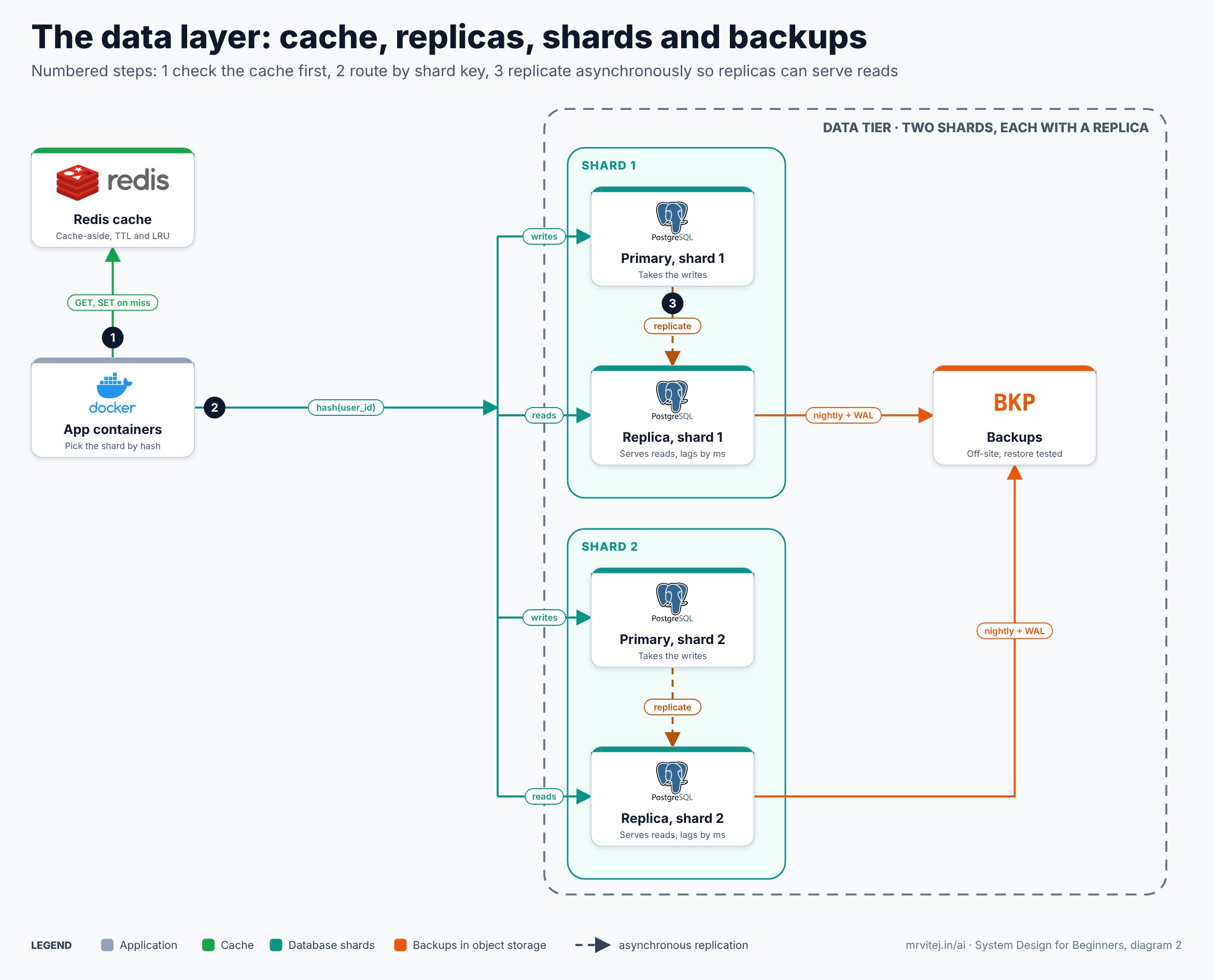
Diagram 2: the data layer. Open the zoomable diagram (scroll or pinch to zoom, drag to pan), or download it as SVG or PNG.
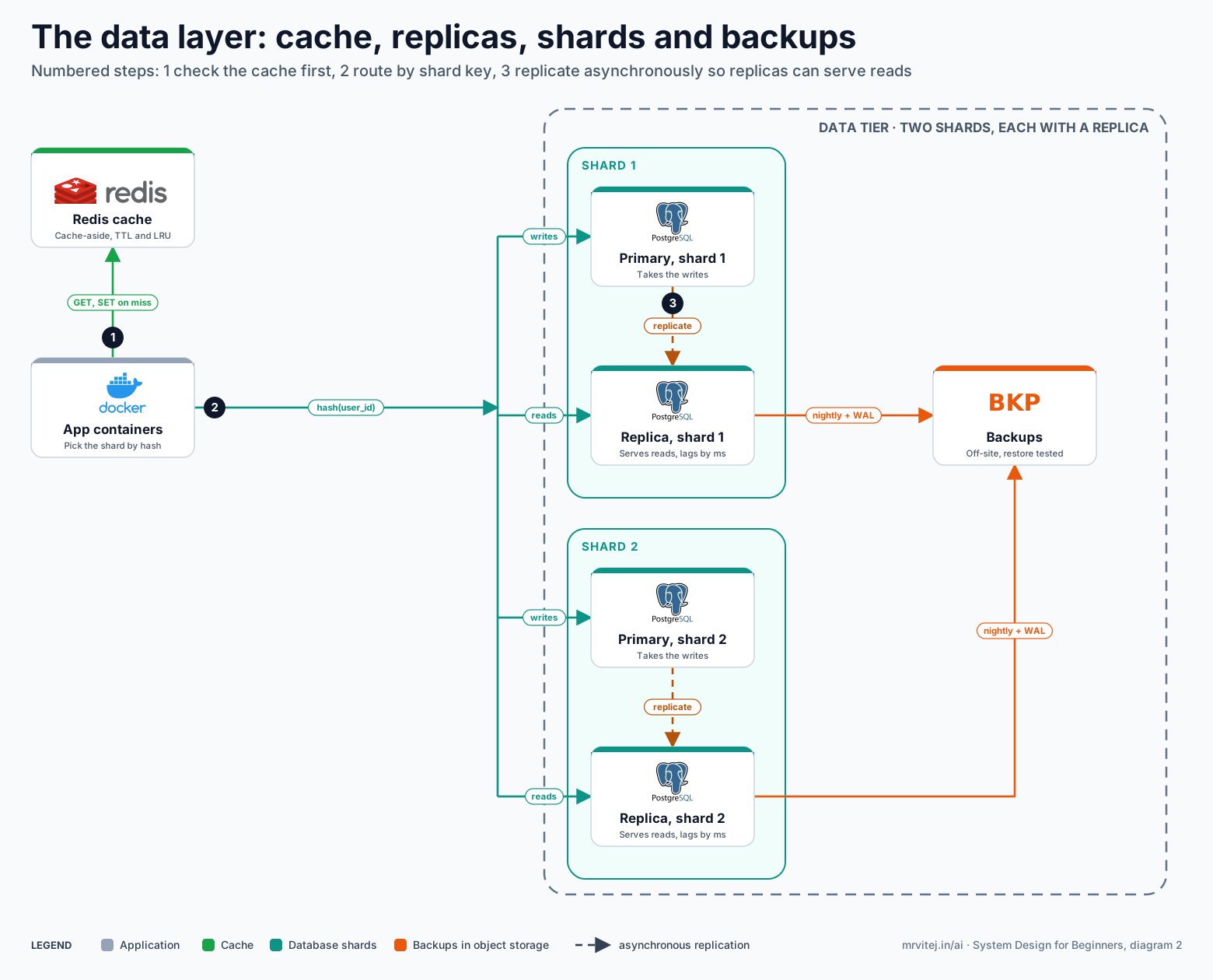
The diagram follows one lookup. The app first checks Redis (step 1). On a miss it computes which shard owns the user by hashing the user id (step 2), then sends writes to that shard’s primary and reads to its replica. The primary streams changes to its replica (step 3), and replicas are backed up off-site.
The most important decision is the shard key: the field that decides which shard a row lives on.
| Strategy | How it works | Good | Bad |
|---|---|---|---|
| Hash of user id | hash(user_id) mod N |
Even spread | Adding a shard moves most keys |
| Range | Users 1 to 1M on shard 1, and so on | Easy range queries | Newest range becomes a hot spot |
| Geography | One shard per region | Low latency, data residency rules | Uneven sizes |
| Directory | A lookup table says where each key lives | Flexible | The directory is a new single point of failure |
A good shard key spreads load evenly and keeps data that is queried together on the same shard. A bad one creates a hot shard: one celebrity’s data or one popular day’s writes overwhelm a single machine while the rest sit idle.
Sharding is a heavy step. Queries across shards (a join between users on different shards) become hard, transactions across shards are painful, and re-balancing is a project. The honest guidance: shard late, after caching, indexes, read replicas and a bigger primary have run out of road.
Consistent hashing
The “adding a shard moves most keys” problem is real. With hash mod N, going from 4 shards to 5 changes the answer for most keys, so most data would have to move. Consistent hashing fixes this by placing both shards and keys on a ring, so adding a shard only takes over a slice from its neighbours. The demo measures it:
# Adding a shard: how many keys move with modulo hashing vs a consistent hash ring?
import bisect, hashlib

def h(s):
    return int(hashlib.md5(s.encode()).hexdigest(), 16)

class Ring:
    def __init__(self, nodes, vnodes=150):
        self.ring = sorted((h(f"{n}#{i}"), n) for n in nodes for i in range(vnodes))
        self.points = [p for p, _ in self.ring]
    def node_for(self, key):
        i = bisect.bisect(self.points, h(key)) % len(self.ring)
        return self.ring[i][1]

keys = [f"user:{i}" for i in range(100_000)]
before = ["db1", "db2", "db3", "db4"]
after = before + ["db5"]

moved_mod = sum(h(k) % 4 != h(k) % 5 for k in keys)
r1, r2 = Ring(before), Ring(after)
moved_ring = sum(r1.node_for(k) != r2.node_for(k) for k in keys)

print(f"keys: {len(keys):,}   shards: 4 -> 5")
print(f"modulo hashing   moved {moved_mod / len(keys):6.1%} of keys")
print(f"consistent ring  moved {moved_ring / len(keys):6.1%} of keys  (ideal is 1/5 = 20.0%)")

counts = {}
for k in keys:
    counts[r2.node_for(k)] = counts.get(r2.node_for(k), 0) + 1
print("keys per shard on the ring:", dict(sorted(counts.items())))
keys: 100,000 shards: 4 -> 5
modulo hashing moved 80.1% of keys
consistent ring moved 18.6% of keys (ideal is 1/5 = 20.0%)
keys per shard on the ring: {'db1': 20723, 'db2': 20534, 'db3': 22402, 'db4': 17692, 'db5': 18649}Adding a fifth shard with simple modulo hashing relocates about 80% of the keys, which would mean a huge data migration. On the ring, about 18.6% move, close to the ideal 20%, and the remaining keys stay exactly where they were. The per-shard counts at the bottom show a reasonably even spread thanks to the 150 virtual nodes per shard. The same technique underlies distributed caches and many NoSQL databases.
Real world: think of a library with books shelved alphabetically across five rooms. If you add a sixth room and re-file every book by a new rule, the library closes for a month. If you instead hand the sixth room a contiguous slice of books from its neighbours, only a few shelves move. The second approach is consistent hashing.
Next: the part of the app that is not rows in a table at all.
Part 8: Media, APIs and real-time
The failure: the first version stored uploaded photos on the app server’s own disk. Then the second server arrived, and a photo uploaded through server A returns a 404 when the request lands on server B. The disk is state, and state breaks horizontal scaling, exactly as sessions did in Part 4. On top of that, a single 8 MB upload ties up an app server for seconds while it streams the file.
The upload path
The fix has two ideas. First, metadata and bytes are stored separately. The database holds a small row (who uploaded it, the caption, where the file is). The file itself goes into object storage, a service built to hold huge numbers of files cheaply and durably (Amazon S3, Google Cloud Storage, Azure Blob Storage, or self-hosted options). Object storage is replicated across devices by the provider, which is how it delivers very high durability.
Second, the file does not travel through your servers. Instead the app uses a pre-signed URL: a temporary, signed link that lets the client upload directly to object storage.
- The client asks the API for permission to upload (a small request).
- The API stores a metadata row and returns a pre-signed URL valid for a few minutes.
- The client uploads the file straight to object storage with that URL.
- The client tells the API the upload is complete.
With an S3-compatible service the API’s part is only a few lines:
import boto3

s3 = boto3.client("s3")

def start_upload(user_id, photo_id):
    key = f"originals/{user_id}/{photo_id}.jpg"
    url = s3.generate_presigned_url(
        "put_object",
        Params={"Bucket": "photo-app-media", "Key": key, "ContentType": "image/jpeg"},
        ExpiresIn=300,                       # the link works for 5 minutes
    )
    return {"upload_url": url, "object_key": key}
The benefit is large. App servers stay light and stateless, the heavy bytes use object storage’s bandwidth rather than yours, and uploads scale on their own. The link is safe to hand out because it is signed for one object and one operation and it expires.
Background resizing
A raw upload is the wrong thing to show in a feed. A 4000-pixel photo of 2 MB on a phone screen is slow and wasteful, so the system also needs a thumbnail, a medium size and a large size. Resizing takes real CPU time, and a user should not wait for it. So it happens in the background, which brings in the next component: the message queue (Part 9).
CDNs
Even with photos safely stored, delivery has the distance problem from Part 3: a user far from your region waits on every image. A CDN (content delivery network) is a network of servers placed around the world. The first user in a region who requests an image causes the CDN to fetch it from your object storage (the origin) and keep a copy. Later users in that region get the image from a nearby server in a few milliseconds.
A CDN gives you three things: lower latency for users, far less load on your origin (a high cache hit ratio means your own servers see a small fraction of the reads), and protection from traffic spikes. Its main caveat is invalidation: once an image is cached at the edge, changing it means purging it or, better, never changing it. The standard trick is to put a version or content hash in the file name, so a new photo is simply a new URL.
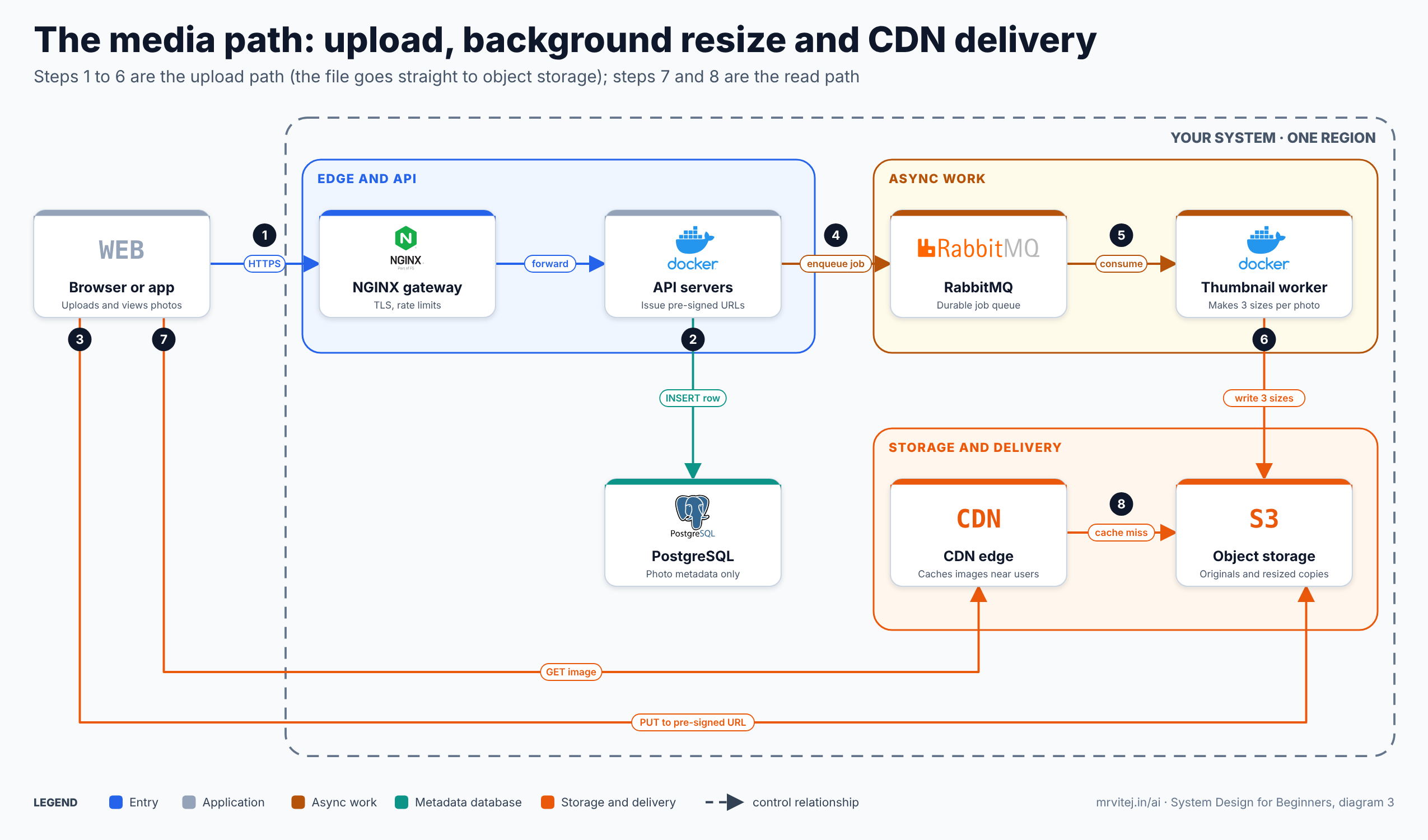
Diagram 3: the media path. Open the zoomable diagram (scroll or pinch to zoom, drag to pan), or download it as SVG or PNG.
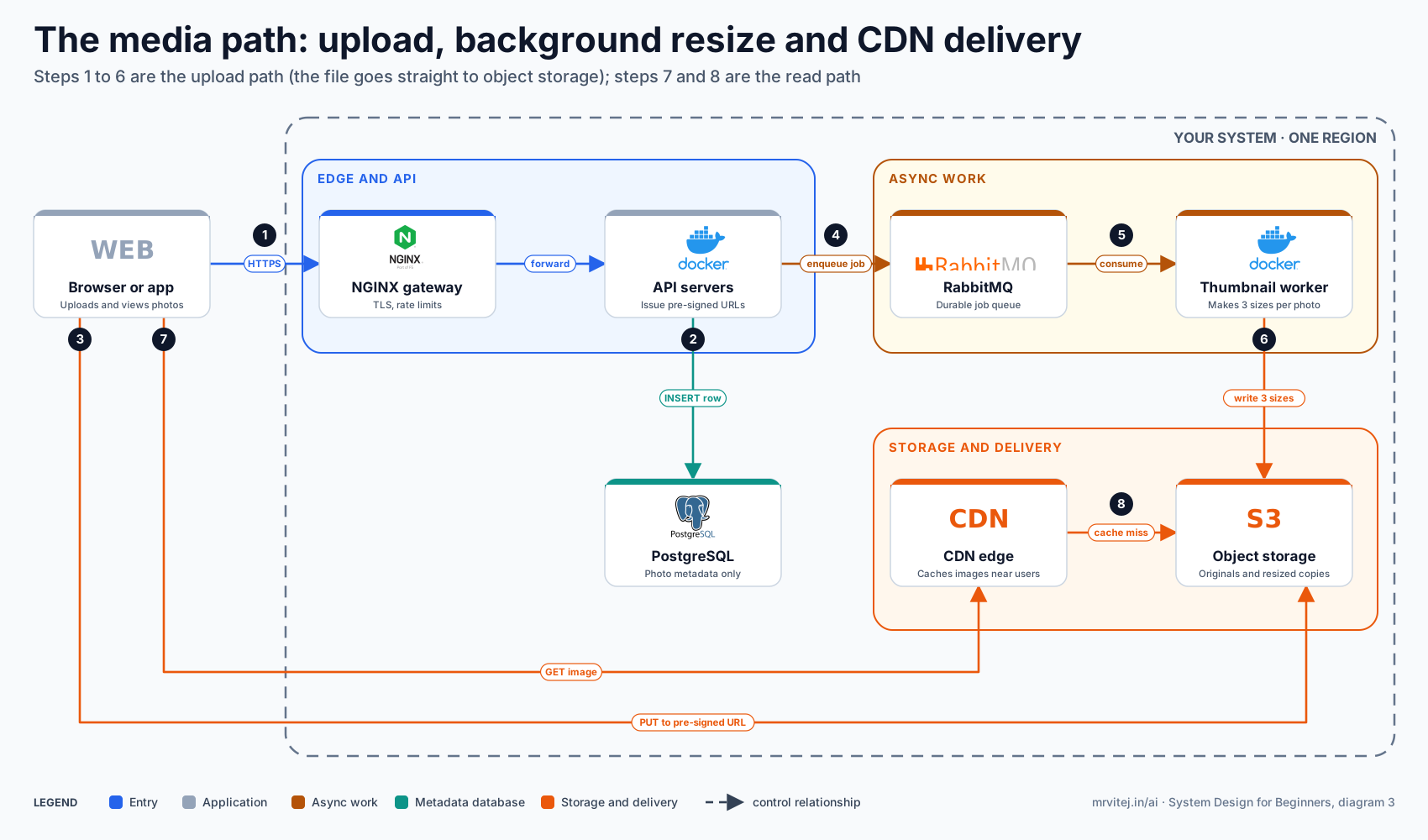
The diagram has two paths. The upload path (steps 1 to 6): the client calls the gateway and API, metadata is inserted into PostgreSQL, the file goes straight to object storage through the pre-signed URL, the API enqueues a resize job in RabbitMQ, and a thumbnail worker consumes it and writes three sizes back to storage. The read path (steps 7 and 8): the client asks the CDN for an image, and only on a cache miss does the CDN fetch it from object storage.
Real world: a newspaper does not drive a copy to every reader. It prints in a few central plants and ships to local distributors, who hand copies to readers. The plants are the origin, the distributors are CDN edge servers, and “run out of copies, ask the plant” is a cache miss.
APIs in plain words
An API is a contract: “send me a request shaped like this, and I will answer in this shape.” Most web APIs use HTTP with REST conventions: nouns as URLs (/photos/910), verbs as HTTP methods (GET read, POST create, PUT or PATCH change, DELETE remove), and standard status codes (200 success, 404 not found, 429 too many requests).
The contract is what lets the mobile app, the website and any third party all use the same back end, and it lets you change the insides without breaking them. Three habits make APIs durable: version them (/v1/), keep responses small, and never return an unbounded list.
That last habit is pagination. “Give me all photos” does not survive contact with millions of rows. There are two styles:
| Style | Request | Good | Bad |
|---|---|---|---|
| Offset | ?offset=40&limit=20 |
Simple, can jump to page N | Slow for deep pages; rows shift if new photos arrive while paging |
| Cursor | ?after=<last_seen_id>&limit=20 |
Fast at any depth, stable | No random jumping to page N |
For an endless scrolling feed, cursor pagination is the right choice, and it works well with the composite index from Part 5.
Real-time: polling, long polling, SSE and WebSockets
Some features need the server to tell the client something new: a notification, a new comment, a live like counter. HTTP is built around the client asking, so there are several ways to bend it.
| Technique | How it works | Cost | Use it for |
|---|---|---|---|
| Polling | Client asks every few seconds | Many wasted requests; delays up to the interval | Simple, low-urgency updates |
| Long polling | Client asks; server holds the request open until there is news | Fewer wasted requests; a connection per client | Moderate real-time without special infrastructure |
| Server-Sent Events | One long-lived HTTP connection, server pushes events one way | Light, auto-reconnects | Notifications, live counters, feeds |
| WebSockets | A persistent two-way connection | A stateful connection per client to manage | Chat, collaboration, games |
The rule of thumb: use the simplest one that meets the need. A photo app’s notification badge is fine with polling every 30 seconds or with SSE. Chat needs WebSockets. Persistent connections also reintroduce state, so servers holding them need care when scaling and deploying, which is one reason to use them only where the feature demands it.
Part 9: Queues, pub/sub and the feed
The failure: upload completes, and the app now needs to resize the image, scan it for policy violations, update follower feeds and send notifications. Doing all of that inside the request makes the upload take eight seconds. Worse, if the notification service is down, the whole upload fails even though the photo saved fine.
Message queues
A message queue is a buffer between a producer and a consumer. The producer drops a message (“resize photo 910”) and moves on at once. A separate worker picks messages up and processes them in its own time.
Queues give you three properties that are hard to get any other way:
- Decoupling. The upload API does not know or care how resizing works, or whether the worker is running at this moment.
- Buffering. A spike of ten thousand uploads becomes ten thousand messages that workers drain steadily, instead of ten thousand simultaneous CPU-heavy jobs crushing the servers.
- Reliability. The message stays in the queue until a worker confirms it finished. If the worker crashes mid-job, the message is delivered to another worker.
A worker using RabbitMQ looks like this:
import pika

conn = pika.BlockingConnection(pika.ConnectionParameters("rabbitmq"))
ch = conn.channel()
ch.queue_declare(queue="resize", durable=True)       # the queue survives a broker restart
ch.basic_qos(prefetch_count=1)                       # one job at a time per worker

def handle(channel, method, properties, body):
    photo_id = body.decode()
    make_three_sizes(photo_id)                       # the slow part
    channel.basic_ack(delivery_tag=method.delivery_tag)   # acknowledge only after success

ch.basic_consume(queue="resize", on_message_callback=handle)
ch.start_consuming()
The acknowledgement after the work is the reliability mechanism. If the worker dies before basic_ack, the broker redelivers the message. That means a job can occasionally run twice, so workers must be idempotent: processing the same message twice must give the same result as processing it once. Resizing photo 910 again simply overwrites the same three files, which is harmless. Idempotency returns in Part 10 as one of the most useful ideas in the whole subject.
Failing messages need an escape hatch. A dead-letter queue collects messages that fail repeatedly, so one poisoned message does not block the line forever and a human can look at it later.
Queue or pub/sub
A queue delivers each message to one consumer. Publish and subscribe (pub/sub) delivers each message to every interested subscriber. The photo app needs both.
| Queue | Pub/sub | |
|---|---|---|
| Delivery | One consumer per message | Every subscriber gets a copy |
| Typical use | Work to be done once (resize this photo) | Facts to be reacted to (a photo was uploaded) |
| Examples | RabbitMQ queues, SQS | Kafka topics, Redis pub/sub, SNS |
When a photo is uploaded, one event, photo.uploaded, is published. Independent consumers each react in their own way: a feed worker updates follower feeds, a notification service alerts followers, a moderation service scans the image, an analytics job counts it. The publisher knows about none of them. Adding a fifth consumer next year requires no change to the upload code. This pattern is called fan-out, and it is how large systems grow features without rewriting the core.
Kafka is the common choice when events must be kept in order, replayed, or consumed by many independent groups, because it stores them in a durable log rather than deleting them when read. RabbitMQ shines for task queues with flexible routing and per-message acknowledgement. They overlap, but the mental model differs: RabbitMQ delivers work, Kafka keeps history.
Interview angle: how does the feed get built?
This is the classic photo-app question, and the answer has a good story shape.
- Pull (fan-out on read). When a user opens the app, fetch the latest photos of everyone they follow and merge them. Writes are cheap, but reads are expensive: someone following 1,000 people triggers 1,000 lookups per refresh.
- Push (fan-out on write). When a user posts, copy the photo id into the precomputed feed of every follower. Reads become a single cheap lookup, but a user with 20 million followers causes 20 million writes for one post.
- Hybrid. Push for ordinary users and pull for celebrities. At read time, take the precomputed feed and merge in recent posts from the few very-high-follower accounts the user follows.
The hybrid is what most real feeds do, and noticing the celebrity problem is the point of the question. Because the photo app is 300 to 1 read-heavy, pushing work to write time is usually the right default, which is why the capstone diagram has a feed worker consuming events and writing into Redis.
Real world: a post office sorts letters in a back room (a queue) so the counter clerk can serve the next customer. A newspaper subscription is pub/sub: one edition, delivered to every subscriber, and the paper does not care how many there are.
Part 10: Failure, protection and operations
The failure: at 2 a.m. the primary database’s disk fills up. Nothing else is wrong, but every page is returning errors, nobody was alerted, and the first sign of trouble is a support email at 7 a.m. Everything so far made the system faster. None of it made the system trustworthy.
Single points of failure
A single point of failure (SPOF) is any component whose death takes the whole system down. The exercise is simple and worth repeating for every design: point at each box and ask “if this dies right now, what happens?”
| Component | If it dies alone | Typical fix |
|---|---|---|
| DNS | Nobody can find you | Managed DNS with multiple name servers |
| Load balancer | No traffic gets in | Active and standby pair, or a managed multi-zone balancer |
| App server | Capacity drops | Many replicas plus health checks |
| Cache | Database takes the full load | Replicated cache; the app must still work without it |
| Database primary | No writes | Replica with automatic failover |
| Queue | Background work stops | Clustered broker, durable queues |
| An entire zone or region | Everything in it | Spread across zones, later across regions |
| The one person who knows how it works | Slow, confused recovery | Runbooks and shared ownership |
The tools are always the same three: redundancy (more than one of everything important), failover (automatic switching to the spare), and backups (a way back when redundancy copies a mistake).
Two numbers turn “we want to be safe” into something you can design for:
- RPO (recovery point objective): how much data you can afford to lose, measured in time. An RPO of five minutes means backups or replication must be at most five minutes behind.
- RTO (recovery time objective): how long you can afford to be down. An RTO of 30 minutes means recovery has to be fast enough, and practised enough, to finish inside that.
Tighter targets cost more. A photo app might accept an RPO of minutes and an RTO of an hour for its feed, but demand an RPO of zero for uploaded originals, because a lost photo cannot be recreated.
Timeouts, retries and idempotency
In a system made of many networked parts, calls fail all the time: packets get lost, servers pause, a dependency is slow. Three rules keep those failures from spreading.
1. Every network call has a timeout. Without one, a slow dependency makes callers wait, requests pile up, threads run out, and a small problem in one service becomes an outage in all of them. This is the most common root cause of cascading failure, and the fix is one line of configuration.
2. Retry, but politely. A short failure is often gone a moment later, so retrying is reasonable. The danger is a retry storm. If a server briefly fails and a thousand clients all retry on the same schedule, the server is hit by a synchronised wave each time it tries to recover. The remedy is exponential backoff (wait longer after each failure) with jitter (add randomness so clients spread out). The demo counts how many retries land in the busiest 100 ms window.
3. Make retries safe with idempotency. A client that times out does not know whether the server processed its request. If it retries “create post” and the first attempt had actually succeeded, the user gets two posts. An idempotency key fixes this: the client sends a unique id with the request, and the server remembers which ids it has handled and replays the earlier result instead of doing the work again.
# Retries: clients that back off on the same schedule retry in lockstep; jitter spreads them out.
import random

random.seed(11)
CLIENTS = 1000

def retry_times(strategy, attempts=4):
    """Seconds after one shared failure at which each client's retries land."""
    times = []
    for _ in range(CLIENTS):
        t = 0.0
        for n in range(attempts):
            if strategy == "fixed":
                t += 1.0                                  # always wait 1 s
            elif strategy == "exponential":
                t += 2.0 ** n                             # wait 1, 2, 4, 8 s
            else:                                         # full jitter: random between 0 and the ceiling
                t += random.uniform(0, 2.0 ** n)
            times.append(t)
    return times

def busiest_100ms(times):
    slots = {}
    for t in times:
        slots[int(t * 10)] = slots.get(int(t * 10), 0) + 1
    return max(slots.values())

print(f"{CLIENTS} clients retry 4 times after one shared failure; requests in the busiest 100 ms:")
for name in ("fixed", "exponential", "jitter"):
    print(f"  {name:<12} {busiest_100ms(retry_times(name)):>5}")

# the server side of a safe retry: an idempotency key makes a repeated POST harmless
done = {}
def create_post(idempotency_key, text):
    if idempotency_key in done:
        return done[idempotency_key], "replayed"
    done[idempotency_key] = f"post-{len(done) + 1}: {text}"
    return done[idempotency_key], "created"

print(create_post("req-9f2", "sunset"))
print(create_post("req-9f2", "sunset"))              # the client timed out and retried
1000 clients retry 4 times after one shared failure; requests in the busiest 100 ms:
fixed 1000
exponential 1000
jitter 157
('post-1: sunset', 'created')
('post-1: sunset', 'replayed')With a fixed delay and with plain exponential backoff, all 1,000 clients retry at the same instants, so the busiest 100 ms receives all 1,000 requests. With jitter the same clients spread out and the busiest window sees 157. The last two lines are the idempotency key at work: the retried request returns the original post instead of creating a second one. Remember also to retry only operations that are safe to repeat, and to put a circuit breaker around a dependency that is failing hard, so callers fail fast instead of piling on.
Rate limiting and security basics
A system also has to survive the wrong kind of traffic: a buggy client in a loop, a scraper, or a deliberate attack. Rate limiting caps how many requests a client may make in a period and answers the rest with HTTP 429. The common algorithm is the token bucket: a bucket fills with tokens at a steady rate up to a maximum; each request spends a token; no tokens, no service. It allows short bursts while enforcing a long-term average.
# Token bucket rate limiter: a steady rate with room for short bursts. Time is simulated so the run is exact.
class TokenBucket:
    def __init__(self, rate_per_sec, burst):
        self.rate, self.capacity = rate_per_sec, burst
        self.tokens, self.last = burst, 0.0

    def allow(self, now):
        self.tokens = min(self.capacity, self.tokens + (now - self.last) * self.rate)
        self.last = now
        if self.tokens >= 1:
            self.tokens -= 1
            return True
        return False

bucket = TokenBucket(rate_per_sec=5, burst=10)      # 5 requests per second, bursts up to 10

# a client sends 30 requests in the first second (one every 1/30 s), then goes quiet, then sends 10 more at t = 4 s
requests = [i / 30 for i in range(30)] + [4.0 + i / 100 for i in range(10)]
allowed = [round(t, 2) for t in requests if bucket.allow(t)]

first_second = [t for t in allowed if t < 1]
print(f"burst of 30 in 1 s   -> allowed {len(first_second)}, rejected {30 - len(first_second)} (HTTP 429)")
print(f"burst of 10 at t=4 s -> allowed {len([t for t in allowed if t >= 4])} (bucket refilled while the client was quiet)")
print("a rejected client should wait and retry; real servers send a Retry-After header")
burst of 30 in 1 s -> allowed 14, rejected 16 (HTTP 429)
burst of 10 at t=4 s -> allowed 10 (bucket refilled while the client was quiet)
a rejected client should wait and retry; real servers send a Retry-After headerOut of a burst of 30 requests in one second, the bucket allowed 14 (the 10 stored tokens plus the roughly four refilled during that second) and rejected 16. After the client went quiet for a few seconds the bucket had refilled, so the next burst of 10 passed. You rarely write this yourself, because the gateway does it. In NGINX:
limit_req_zone $binary_remote_addr zone=api:10m rate=5r/s;

server {
  location /api/ {
    limit_req zone=api burst=10 nodelay;
    limit_req_status 429;
    proxy_pass http://photo_app;
  }
}
Security is a topic of its own, but a beginner design should include these basics from the start:
- TLS everywhere, including between internal services where practical.
- Authentication and authorisation: know who is calling, and check what they are allowed to do on every request.
- Signed, expiring URLs for private files, as in Part 8.
- Input validation and parameterised queries, so user input never becomes executable code (SQL injection).
- Secrets in a secret manager, never in source code or images.
- Least privilege: each service gets only the access it needs.
The CAP theorem without the math
When data lives on several machines connected by a network, the network can fail. A partition is when some machines cannot reach others. The CAP theorem says that during a partition you must choose between two things:
- Consistency (C): every read sees the latest write, so a node that cannot confirm it is up to date refuses to answer.
- Availability (A): every request gets an answer, even if that answer might be slightly out of date.
You cannot have both while the partition lasts, and partitions are a fact of life, so the real choice is C or A. Outside a partition the system can offer both, though the trade-off between latency and consistency persists.
The mature insight is that the choice is per kind of data, not per system:
| Data | Choice | Reasoning |
|---|---|---|
| Like count on a photo | Availability | Showing 1,203 instead of 1,204 for a moment hurts nobody |
| The feed | Availability | A slightly stale feed beats an error page |
| Username uniqueness at signup | Consistency | Two people must not both get the same name |
| Payments or subscription state | Consistency | Wrong money is worse than a brief refusal |
| Session validity after logout | Consistency, usually | A logged-out token that still works is a security hole |
Interview angle: consistency or availability, per data
Do not declare “our system is AP” and stop. Walk through two or three kinds of data and say which side each falls on and why. That one habit separates a rehearsed answer from an understood one.
Monitoring 101
You cannot fix what you cannot see, and in the 2 a.m. story the real failure was not the full disk but the silence. Monitoring has three pillars:
| Pillar | What it is | Answers | Example tools |
|---|---|---|---|
| Logs | Timestamped records of events | “What exactly happened?” | Fluentd, Loki, Elasticsearch |
| Metrics | Numbers over time | “Is something wrong, and how bad?” | Prometheus, Grafana |
| Traces | The path of one request across services | “Where did the time go?” | Jaeger, OpenTelemetry |
Metrics tell you that something is wrong, logs and traces tell you why. For each service, start with the four golden signals: latency (how long requests take), traffic (how many), errors (how many fail) and saturation (how full the resources are: CPU, memory, disk, connections). The 2 a.m. disk failure would have been a saturation alert at 80% days earlier.
The second discipline is what to alert on. Alert on symptoms that hurt users (error rate, latency) rather than every possible cause. A CPU spike that no user notices should not wake anyone, while a rising error rate should, whatever its cause. Too many alerts teach people to ignore them. A Prometheus rule for the symptom looks like this:
groups:
  - name: photo-app
    rules:
      - alert: HighErrorRate
        expr: sum(rate(http_requests_total{status=~"5.."}[5m])) / sum(rate(http_requests_total[5m])) > 0.02
        for: 10m
        labels: { severity: page }
        annotations:
          summary: "More than 2% of requests have been failing for 10 minutes"
Self-healing
Detection is good. Automatic recovery is better. Kubernetes watches the containers it runs and repairs them: a liveness probe that fails makes it restart the container, a readiness probe that fails removes the pod from the load balancer until it recovers, and if a whole node dies the pods are rescheduled elsewhere. The configuration that expresses this is small:
apiVersion: apps/v1
kind: Deployment
metadata: { name: photo-api }
spec:
  replicas: 3
  selector: { matchLabels: { app: photo-api } }
  template:
    metadata: { labels: { app: photo-api } }
    spec:
      containers:
        - name: api
          image: myorg/photo-api:1.0
          ports: [{ containerPort: 3000 }]
          readinessProbe: { httpGet: { path: /ready, port: 3000 }, periodSeconds: 5 }
          livenessProbe: { httpGet: { path: /healthz, port: 3000 }, periodSeconds: 10, failureThreshold: 3 }
Delete one of the three pods and a replacement appears within seconds. This is the same health-check idea as the load balancer in Part 4, applied one level up, and it is easy to watch on a test cluster: delete a pod and see the replacement appear.
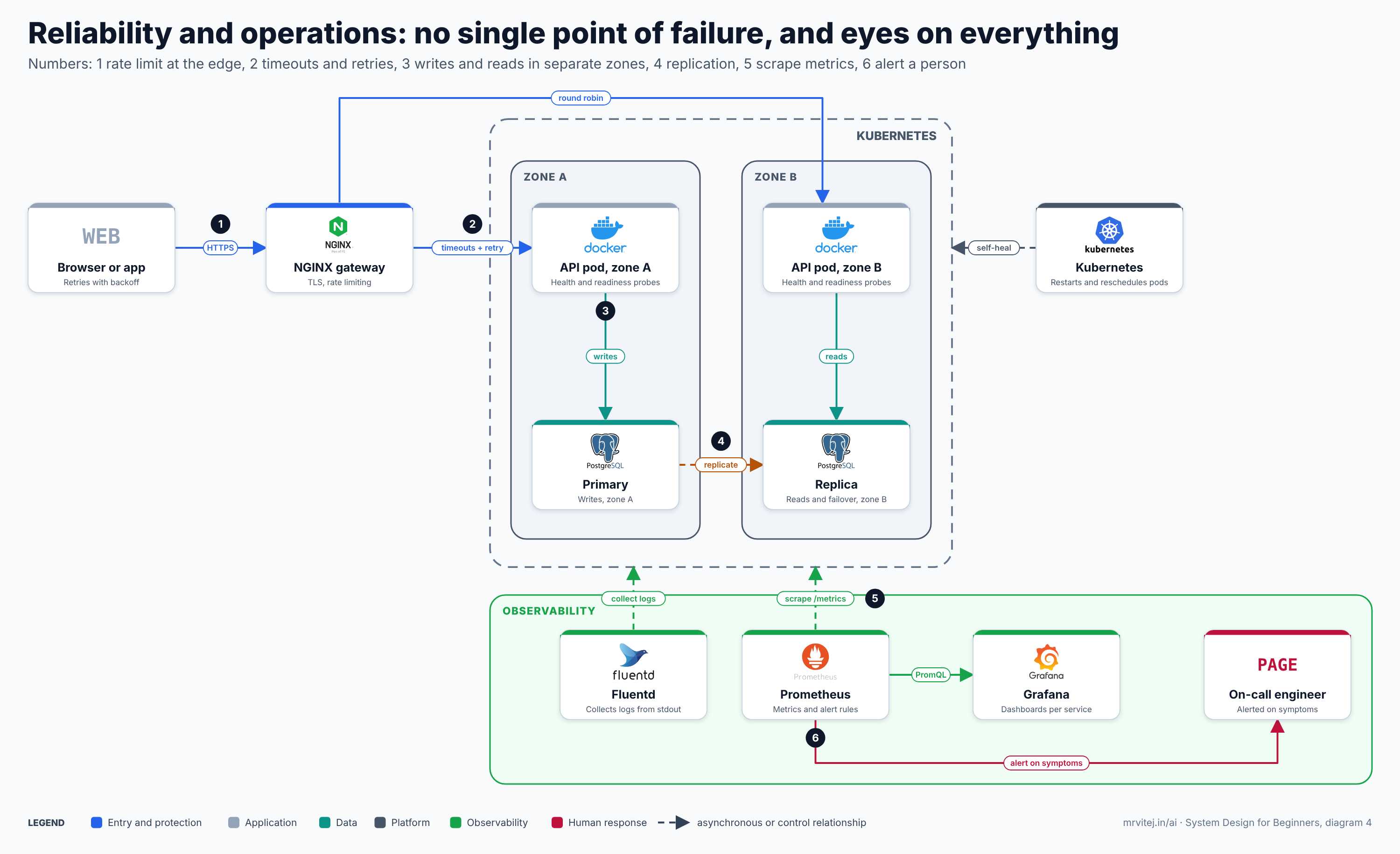
Diagram 4: reliability and operations. Open the zoomable diagram (scroll or pinch to zoom, drag to pan), or download it as SVG or PNG.
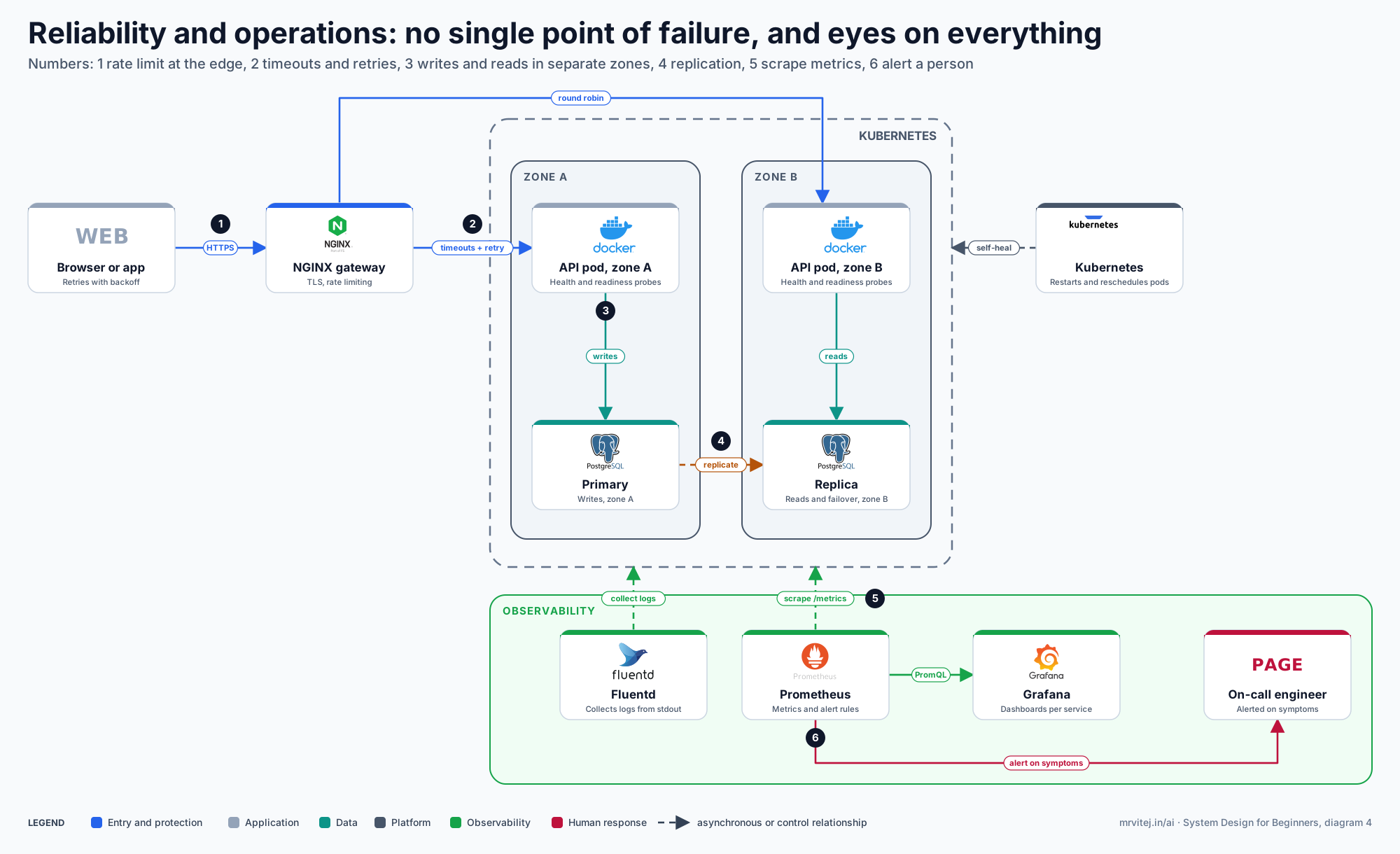
The diagram brings the part together. NGINX rate limits at the edge (step 1) and applies timeouts and retries towards the API pods (step 2), which are spread across two zones with writes going to the primary and reads to the replica (steps 3 and 4). Kubernetes heals the pods, Fluentd collects logs, Prometheus scrapes metrics (step 5) and Grafana draws them, and Prometheus alerts a human on user-visible symptoms (step 6).
Real world: an aircraft has redundant engines, hydraulics and flight computers, and a cockpit full of instruments that warn the crew about trouble long before it becomes an emergency. Nobody builds the aircraft without either half, and nobody should build a system without them either.
Part 11: Estimation, and putting it all together
The failure: a design with no numbers is a guess. “We will need a cache” and “we will need sixty servers” are equally confident claims until something measures them.
Back-of-the-envelope estimation
Back-of-the-envelope estimation converts user behaviour into load: requests per second, storage per day, bandwidth. It does not need to be accurate; it needs to be right to within a factor of two or three, quickly, with every assumption written down. The skill is the arithmetic you can do on paper: a day has about 86,400 seconds, so a million events a day is about 12 per second.
Using the assumptions from Part 2, here is a small calculator you can edit and rerun:
# Back-of-envelope sizing for the photo app. Change the assumptions and rerun.
DAU = 10_000_000              # daily active users
UPLOADS_PER_USER = 0.2        # one upload for every five active users per day
VIEWS_PER_USER = 60           # photos viewed per user per day
AVG_PHOTO_MB = 2.0            # original upload
THUMBS_FACTOR = 0.25          # thumbnails and resized copies add 25% on top
PEAK_FACTOR = 3               # peak traffic vs the daily average
CACHE_HIT = 0.90              # share of reads served by the CDN or cache
SECONDS = 86_400

uploads_day = DAU * UPLOADS_PER_USER
views_day = DAU * VIEWS_PER_USER
upload_rps = uploads_day / SECONDS
read_rps = views_day / SECONDS
storage_day_tb = uploads_day * AVG_PHOTO_MB * (1 + THUMBS_FACTOR) / 1_000_000
egress_gbps = read_rps * PEAK_FACTOR * 0.25 * 8 / 1000   # 250 KB average delivered size

print(f"uploads per day        : {uploads_day:,.0f}")
print(f"views per day          : {views_day:,.0f}")
print(f"upload RPS (avg/peak)  : {upload_rps:,.1f} / {upload_rps * PEAK_FACTOR:,.1f}")
print(f"read RPS (avg/peak)    : {read_rps:,.0f} / {read_rps * PEAK_FACTOR:,.0f}")
print(f"read:write ratio       : {views_day / uploads_day:.0f} : 1")
print(f"origin RPS at peak     : {read_rps * PEAK_FACTOR * (1 - CACHE_HIT):,.0f}  (after {CACHE_HIT:.0%} cache hits)")
print(f"new storage per day    : {storage_day_tb:,.2f} TB")
print(f"new storage per year   : {storage_day_tb * 365 / 1000:,.2f} PB")
print(f"peak delivery bandwidth: {egress_gbps:,.1f} Gbit/s")
print(f"app servers at 500 RPS each, peak origin load: {read_rps * PEAK_FACTOR * (1 - CACHE_HIT) / 500:,.1f}")
uploads per day : 2,000,000
views per day : 600,000,000
upload RPS (avg/peak) : 23.1 / 69.4
read RPS (avg/peak) : 6,944 / 20,833
read:write ratio : 300 : 1
origin RPS at peak : 2,083 (after 90% cache hits)
new storage per day : 5.00 TB
new storage per year : 1.82 PB
peak delivery bandwidth: 41.7 Gbit/s
app servers at 500 RPS each, peak origin load: 4.2Make the numbers earn their place
A number is worth computing only if it changes a decision. Read the output that way:
| Number | What it tells you | Decision it drives |
|---|---|---|
| 300 : 1 read to write ratio | The system is overwhelmingly read-heavy | Cache aggressively, use read replicas, push feeds at write time |
| About 23 uploads/s on average, 69 at peak | Write volume is modest | One primary database handles writes for a long time; sharding is not urgent |
| About 21,000 reads/s at peak | Too much for the database directly | A cache and CDN are mandatory, not optional |
| About 2,100 origin requests/s after 90% cache hits | A small fleet can handle what is left | Roughly four app servers at 500 RPS each, so plan eight to ten for headroom and zone failure |
| 5 TB of new storage per day, about 1.8 PB per year | Far beyond any single disk | Object storage with lifecycle rules, not database or local disk |
| About 42 Gbit/s of image delivery at peak | Too much for your own network | The CDN must carry almost all of it |
Notice what the numbers refused to justify: sharding the database for writes, or a hundred servers. A beginner’s design that begins with “we need a hundred microservices” is contradicted by the arithmetic on the first page. Every figure above rests on the assumptions at the top of the script, so if the real product has 100 million active users or different habits, change the constants and rerun. The skill is the method, not these particular numbers.
The whole system
Everything from the previous parts now fits into one picture. The diagram shows the photo app complete, with twelve numbered steps.
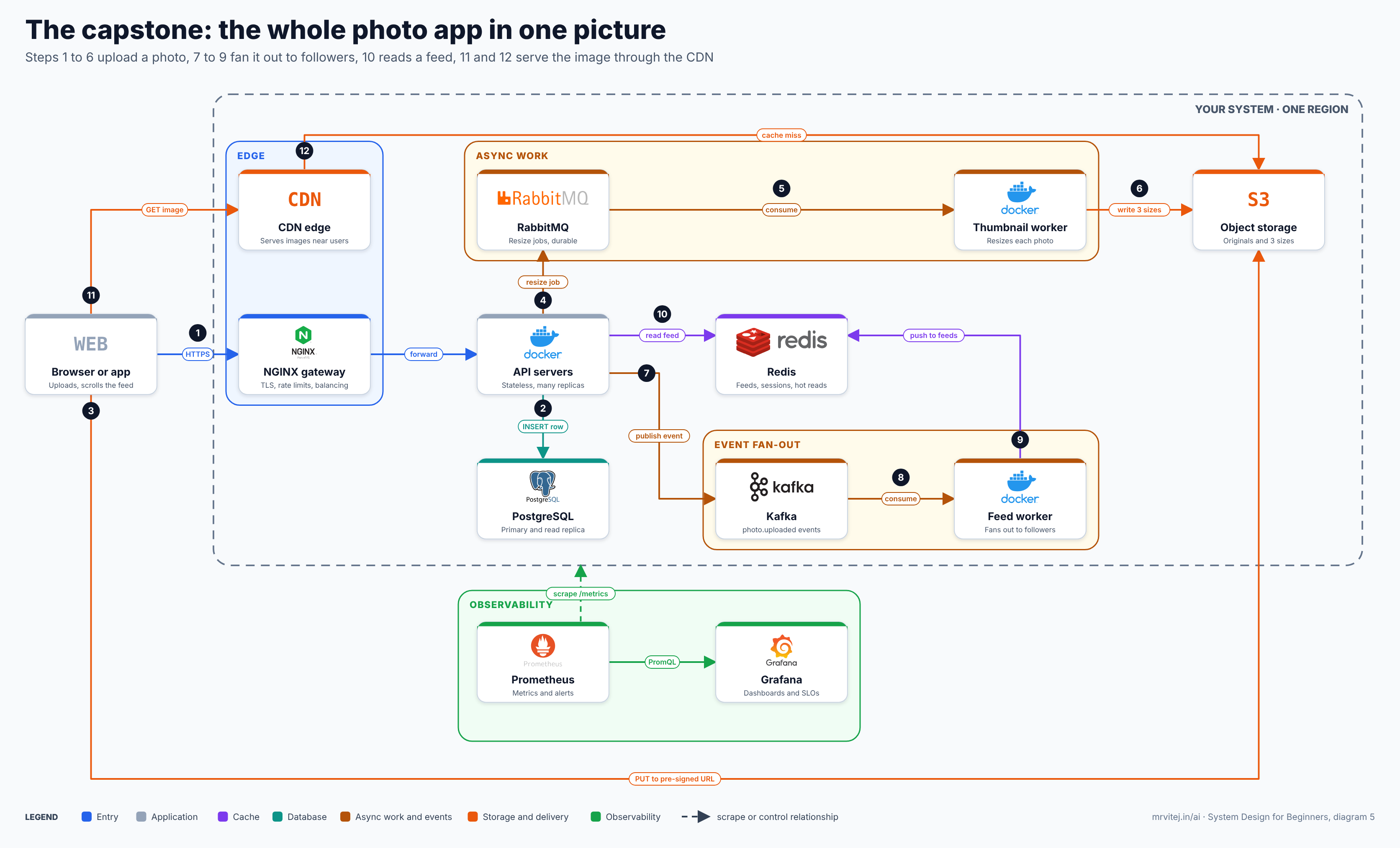
Diagram 5: the whole photo app. Open the zoomable diagram (scroll or pinch to zoom, drag to pan), or download it as SVG or PNG.
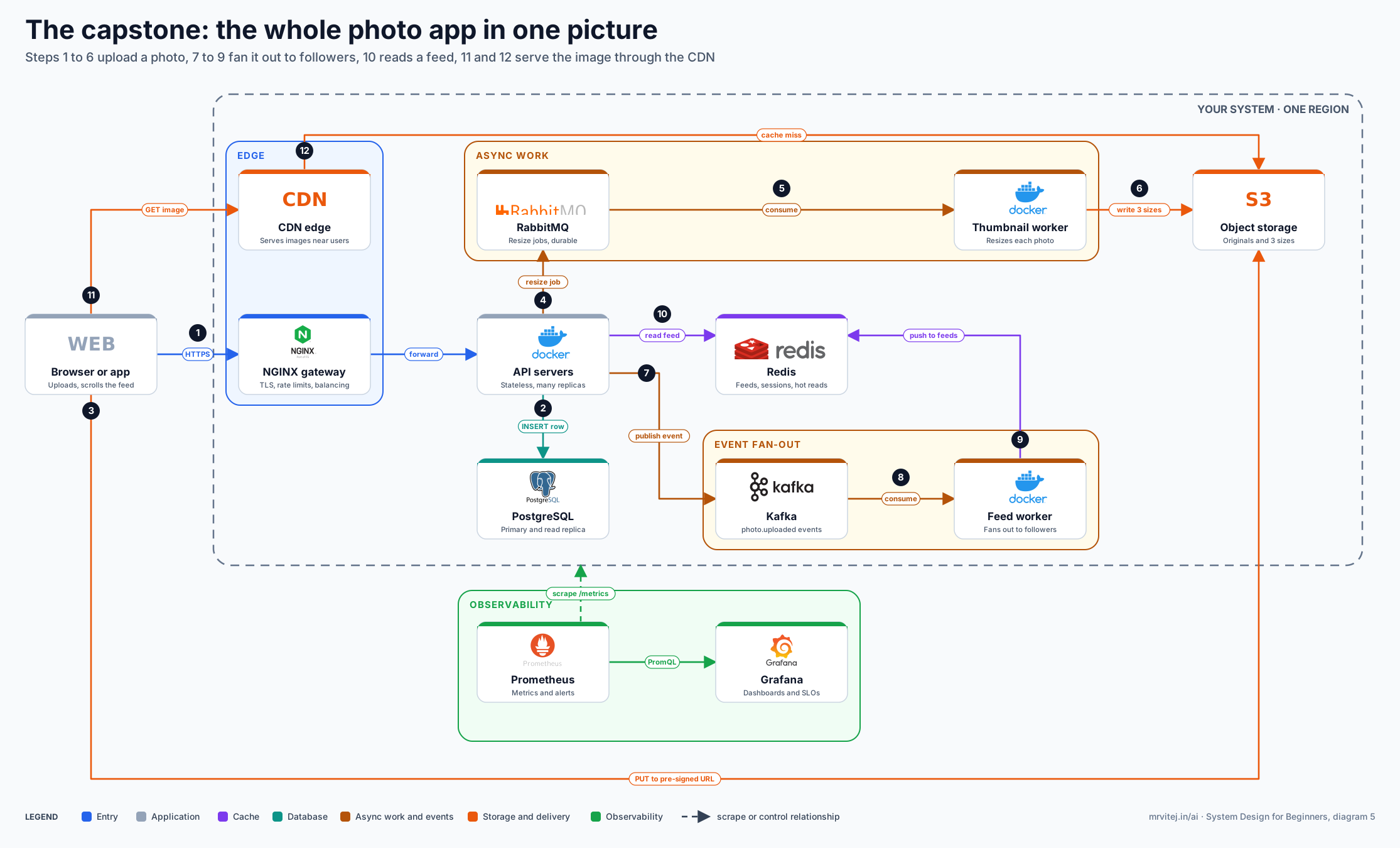
Follow it once, slowly.
Uploading a photo (steps 1 to 6).
- The client sends the request over HTTPS to the NGINX gateway, which applies TLS, rate limits and balancing and forwards it to a stateless API server.
- The API inserts a metadata row into PostgreSQL (a pointer, not the image).
- The client uploads the file straight to object storage with a pre-signed URL.
- The API enqueues a resize job in RabbitMQ.
- A thumbnail worker consumes the job.
- The worker writes three sizes back to object storage.
Telling the followers (steps 7 to 9).
7. The API publishes a photo.uploaded event to Kafka.
8. The feed worker consumes the event.
9. It pushes the new photo id into the follower feeds held in Redis. For accounts with a huge number of followers it would skip this step and let readers pull instead (the hybrid from Part 9).
Reading (steps 10 to 12). 10. A feed request reads the precomputed feed from Redis, falling back to PostgreSQL if needed. 11. Image URLs in the feed are fetched from the CDN. 12. Only on a CDN miss does the request reach object storage.
Prometheus scrapes everything and Grafana presents it, closing the loop from Part 10. Every box on the picture is there because of a specific failure earlier in the article, and every arrow is labelled with what travels over it.
What would change at ten times the size
Scaling is a conversation with the numbers, not a checklist. At ten times the load you would likely re-ask the same questions and find: more read replicas and then sharding for the heaviest tables, a bigger Redis cluster with careful key design, queue partitioning for the workers, a second region for latency and disaster recovery, and tighter cost control on storage and egress. What would not change is the method: ask the five questions, find the bottleneck, apply the smallest fix, and name what the fix breaks.
Part 12: The one-page recap
Every part as problem, fix, new problem
| Part | What broke | The fix | The new problem it creates |
|---|---|---|---|
| One server | Capacity and a single point of failure | Scale up, then out | Which server gets each request? |
| Load balancer | Traffic spread and health | NGINX with health checks, active and standby | Servers remember users, so sessions break |
| Stateless tier | Random logouts | Sessions in Redis | Redis is now critical too |
| Indexes | Slow queries | Composite index on filter then sort columns | Slower writes, more storage |
| Caching | Database overloaded by repeat reads | Cache-aside with TTLs | Stale data, stampedes |
| Replication | Single database, read load | Replicas, failover | Lag, split brain, not a backup |
| Sharding | One database cannot hold or take the writes | Shard by a well-chosen key, consistent hashing | Cross-shard queries, hot shards, re-balancing |
| Object storage and CDN | Files on app disks, distance | Pre-signed uploads, CDN | Cache invalidation at the edge |
| Queues and pub/sub | Slow, fragile request path | Background workers, events, fan-out | Duplicates, so idempotency; ordering |
| Reliability | Cascading failures, abuse | Timeouts, backoff with jitter, rate limits | Tuning, and more moving parts |
| CAP | Partitions between copies | Choose consistency or availability per data | Complexity of mixed choices |
| Monitoring | Silent failures | Logs, metrics, traces, symptom alerts | Alert fatigue if done badly |
| Estimation | Guesswork | Numbers that drive decisions | Assumptions that must be revisited |
Common mistakes
- Drawing boxes before asking who the users are and how many.
- Reaching for microservices, sharding or Kafka on day one.
- Naming a product instead of giving the reason for it.
- Forgetting that every new component is a new failure to design for.
- Putting state in app servers, or large files in the database.
- Retrying without backoff, jitter or idempotency.
- Treating replication as a backup, or never testing a restore.
- Alerting on causes rather than symptoms.
- Quoting numbers that do not change any decision.
Practising
The best way to make these ideas stick is to build the pieces and break them on purpose: two containers behind a load balancer, a slow query fixed with an index, cache-aside with Redis, replication and failover, a message queue with RabbitMQ, self-healing and rate limiting on Kubernetes, and finally the whole photo app. The Docker Compose and NGINX snippets in this article give you a starting point, and the six demos run with nothing but Python 3 (the standard library is enough). Change a constant, rerun, and watch which conclusion changes.
When you practise answering design questions aloud, keep the same shape each time. Ask the five questions. Sketch the simplest thing that works. Find the first bottleneck with a number. Fix it with the smallest component that helps. Say what that component breaks. Repeat until the numbers are satisfied. That loop is the entire subject.
References and further reading
Books
- Martin Kleppmann, Designing Data-Intensive Applications, O’Reilly, 2017. The standard deep dive on replication, partitioning, consistency and messaging (Parts 5 to 10 here).
- Michael T. Nygard, Release It!, 2nd edition, Pragmatic Bookshelf, 2018. Timeouts, circuit breakers, bulkheads and other stability patterns (Part 10).
- Betsy Beyer, Chris Jones, Jennifer Petoff and Niall Richard Murphy (eds.), Site Reliability Engineering, O’Reilly, 2016. Free to read online; monitoring, alerting and service levels (Part 10).
Websites and documentation
- Google SRE book, Monitoring Distributed Systems: the four golden signals.
- Marc Brooker, Timeouts, retries, and backoff with jitter, AWS Builders’ Library: why jitter matters.
- NGINX documentation, ngx_http_limit_req_module: rate limiting with
limit_req_zoneandburst. - PostgreSQL documentation, Using EXPLAIN: reading query plans.
- Kubernetes documentation, Configure Liveness, Readiness and Startup Probes.
- Prometheus documentation, Alerting rules.
- RabbitMQ documentation, Consumer Acknowledgements and Publisher Confirms.
- Boto3 documentation, Presigned URLs.