KServe is a model-serving platform for Kubernetes. You describe a trained model in a custom resource called an InferenceService (its location in object storage and its format, such as scikit-learn, XGBoost, ONNX or a Hugging Face model), and KServe creates the pods, the model server inside them, the network route and the autoscaling, then keeps them reconciled. Clients call the result over REST or gRPC, using a protocol that does not depend on the framework that produced the model. It began in 2019 as KFServing inside Kubeflow, with Google, IBM, Bloomberg, NVIDIA and Seldon as its founders, was donated to the LF AI & Data Foundation in 2022, and was accepted into the CNCF as an incubating project on 29 September 2025. This brief explains KServe from the problem it solves to installing it, serving a real scikit-learn model from Google Cloud Storage, scaling and updating it, monitoring it and securing it, and it is honest about the limits that matter, in particular that canary rollouts and scale to zero belong to one of its two deployment modes only.
CNCF daily · Sprint 4, post 8 of 15 · Inference
At a glance
| Category | Inference › Framework |
| CNCF status | Incubating, accepted 29 September 2025 |
| Origin | KFServing (2019, Kubeflow), renamed KServe in 2022; LF AI & Data from 2022; CNCF from 2025 |
| Written in | Go (controllers) and Python (the model servers and SDK) |
| License | Apache 2.0 |
| Latest release | v0.21.0, tagged 24 September 2026 (v0.20.0 on 6 August 2026, v0.19.0 on 12 June 2026) |
| Kubernetes | 1.32 or newer |
| Main resources | InferenceService, ServingRuntime and ClusterServingRuntime, InferenceGraph, LLMInferenceService (alpha API v1alpha2), local model cache resources |
| Deployment modes | Knative (serverless) and Standard (plain Kubernetes Deployments; earlier called RawDeployment) |
| Protocols | KServe v1 REST, the Open Inference Protocol (v2) over REST and gRPC, and OpenAI-compatible APIs for generative models |
| Install | Helm charts from an OCI registry, release YAML, Kustomize or quick-install scripts |
| Community | 19 maintainers, more than 300 contributors and more than 30 adopting organisations, as stated in the CNCF acceptance announcement |
The problem KServe solves
A data scientist ends a training run with a file: a pickled scikit-learn pipeline, an ONNX graph, a set of model weights. Turning that file into a service that other systems can call is a separate engineering job, and teams usually repeat it per model. They write a small web server, containerise it, write a Deployment, a Service and an Ingress, add an autoscaler, add metrics, decide how to roll out version two without breaking callers, and then find that every model has a slightly different request format. The result is a pile of one-off servers that each need their own care.
KServe makes that job declarative and uniform:
- One resource per model. The InferenceService holds the model location and format. The controller derives everything else.
- Reusable serving runtimes. A runtime is a container image that knows how to load a model format and answer requests (scikit-learn, XGBoost, Triton, vLLM and more). You pick a format, and KServe picks a matching runtime.
- A standard inference protocol. Callers use the same request shape for any framework, which lets you swap a model or a runtime without changing the callers.
- Platform behaviour for free. Autoscaling, revisions, request logging, Prometheus metrics, a model download step and optional pre- and post-processing come with the platform, not with each model.
It does not train models, track experiments or store a model registry. It starts where those stop: a model artefact in storage and a need to serve it reliably.
Key concepts
- InferenceService (ISVC). The main resource. Its
spechas a predictor and, optionally, a transformer and an explainer. - Predictor. The component that runs the model, usually through a serving runtime. It is the only mandatory component.
- Transformer. An optional container that converts incoming requests into the model’s input (pre-processing) and the model’s output into the response (post-processing), for example feature lookups or encoding.
- Explainer. An optional component that returns explanations for predictions through an
:explaincall in protocol v1. - ServingRuntime and ClusterServingRuntime. A namespaced and a cluster-wide template for a model server: the image, arguments, resources, the model formats it supports, and the protocol versions it speaks. KServe ships a set of ClusterServingRuntimes.
- Model format. A name and version such as
sklearn,xgboost,onnxorhuggingface. A runtime that lists a format withautoSelect: trueis considered when an ISVC names that format and no runtime. - Storage initializer. An init container that downloads the model from
storageUriinto the pod before the server starts. Supported schemes includegs://,s3://, Azure Blob storage, PVCs, Hugging Face, plain URIs and OCI images. - InferenceGraph. A resource that chains or branches several InferenceServices, with node types such as sequence, splitter, ensemble and switch.
- LLMInferenceService. A second resource, introduced for generative workloads and built on the llm-d framework, with routing that is aware of the key-value cache, separate prefill and decode stages, and multi-node parallelism. It reached production readiness in v0.17.
- Deployment mode. Knative or Standard. The choice decides networking, autoscaling and rollout features, and the sections below spell out the differences.
Architecture
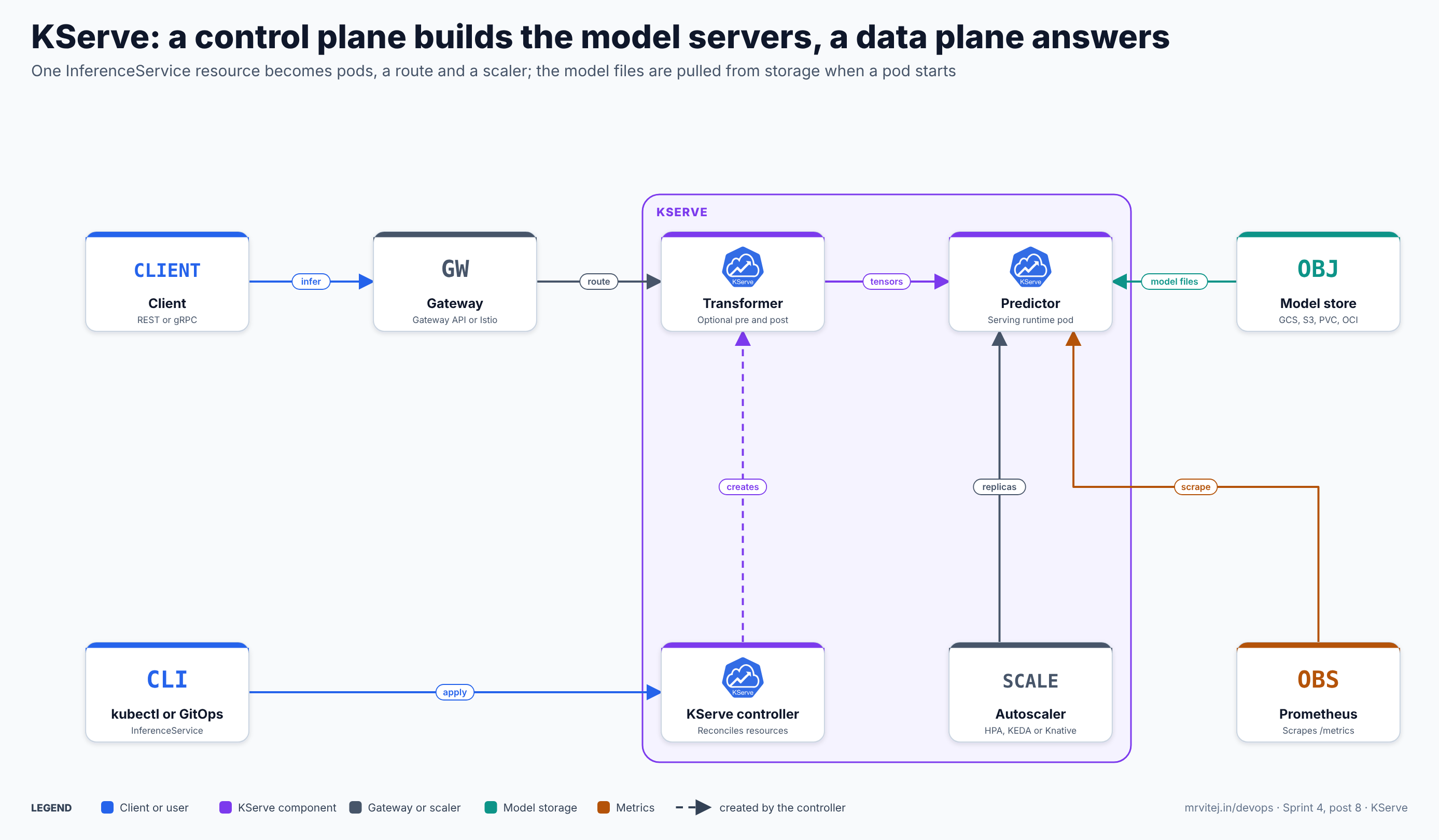
The control plane builds the servers, the data plane answers requests, and the model files come from storage when a pod starts. Blue is a client or user, purple a KServe component, grey a gateway or scaler, teal model storage and orange metrics. Open the zoomable diagram, or download it as SVG or PNG.
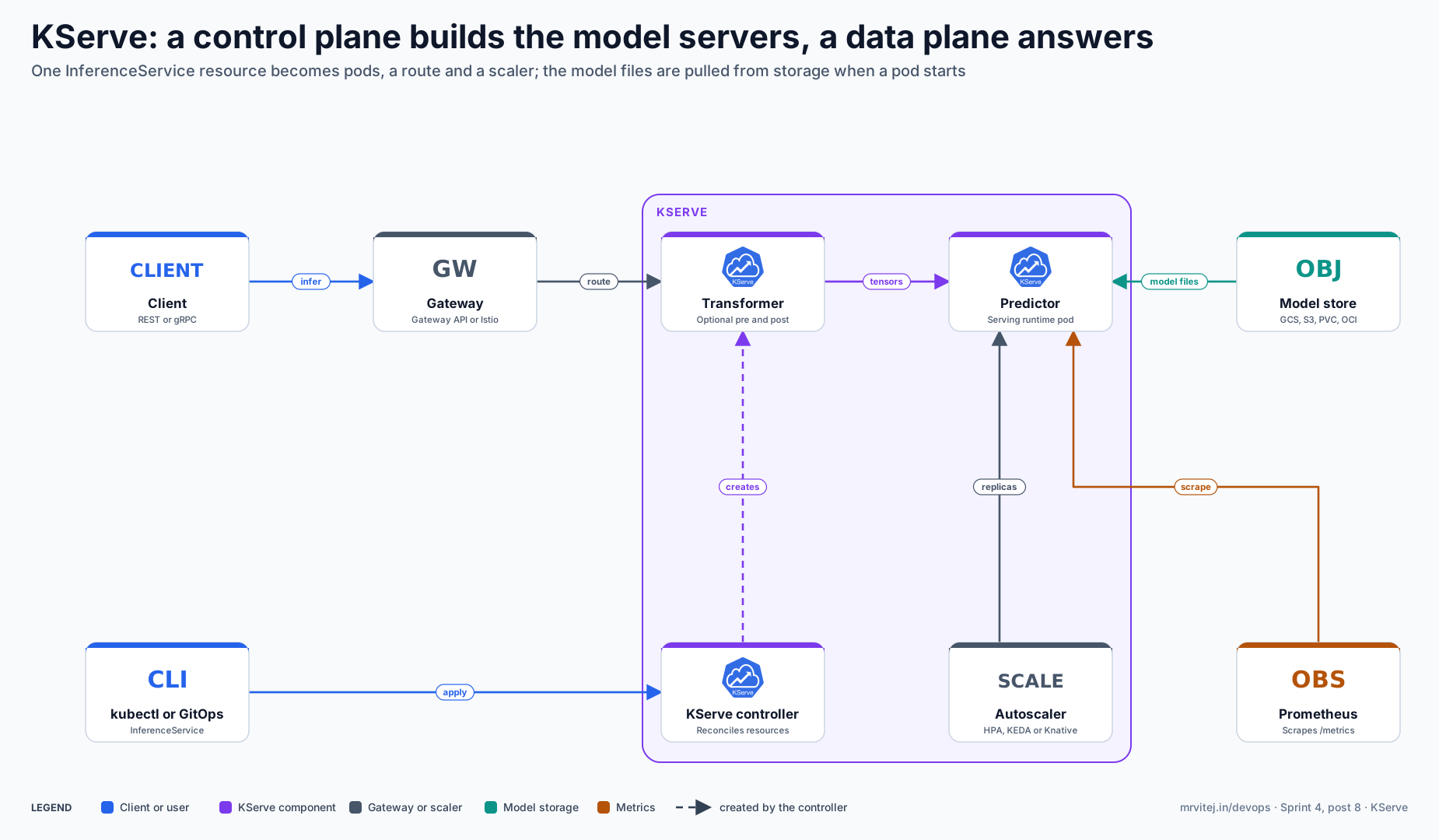
| Component | Responsibility |
|---|---|
| Client | Sends inference requests over REST or gRPC using the v1, v2 or OpenAI-style protocol |
| Gateway | The entry point. In Standard mode it is a Gateway API gateway (recommended) or a Kubernetes Ingress; in Knative mode it is the Knative networking layer, commonly Istio or Kourier |
| Transformer | Optional pre- and post-processing container in front of the predictor |
| Predictor | The pod running a serving runtime with the loaded model; it is what you scale |
| Model store | Where the model files live (GCS, S3, a PVC, Hugging Face or an OCI image); read when a pod starts |
| KServe controller | Watches InferenceServices, chooses a runtime, creates the Deployments or Knative Services, the Services and the routes, and reports status and the URL |
| Autoscaler | The Kubernetes HPA, KEDA or the Knative Pod Autoscaler, depending on mode |
| Prometheus | Scrapes the metrics endpoint exposed by the model server pods |
Design principle. KServe splits management from execution. The control plane only reconciles resources, so a controller outage does not interrupt requests to pods that already run. The data plane stays small: a gateway, optionally a transformer, and a model server that speaks a standard protocol.
From an InferenceService to the first prediction
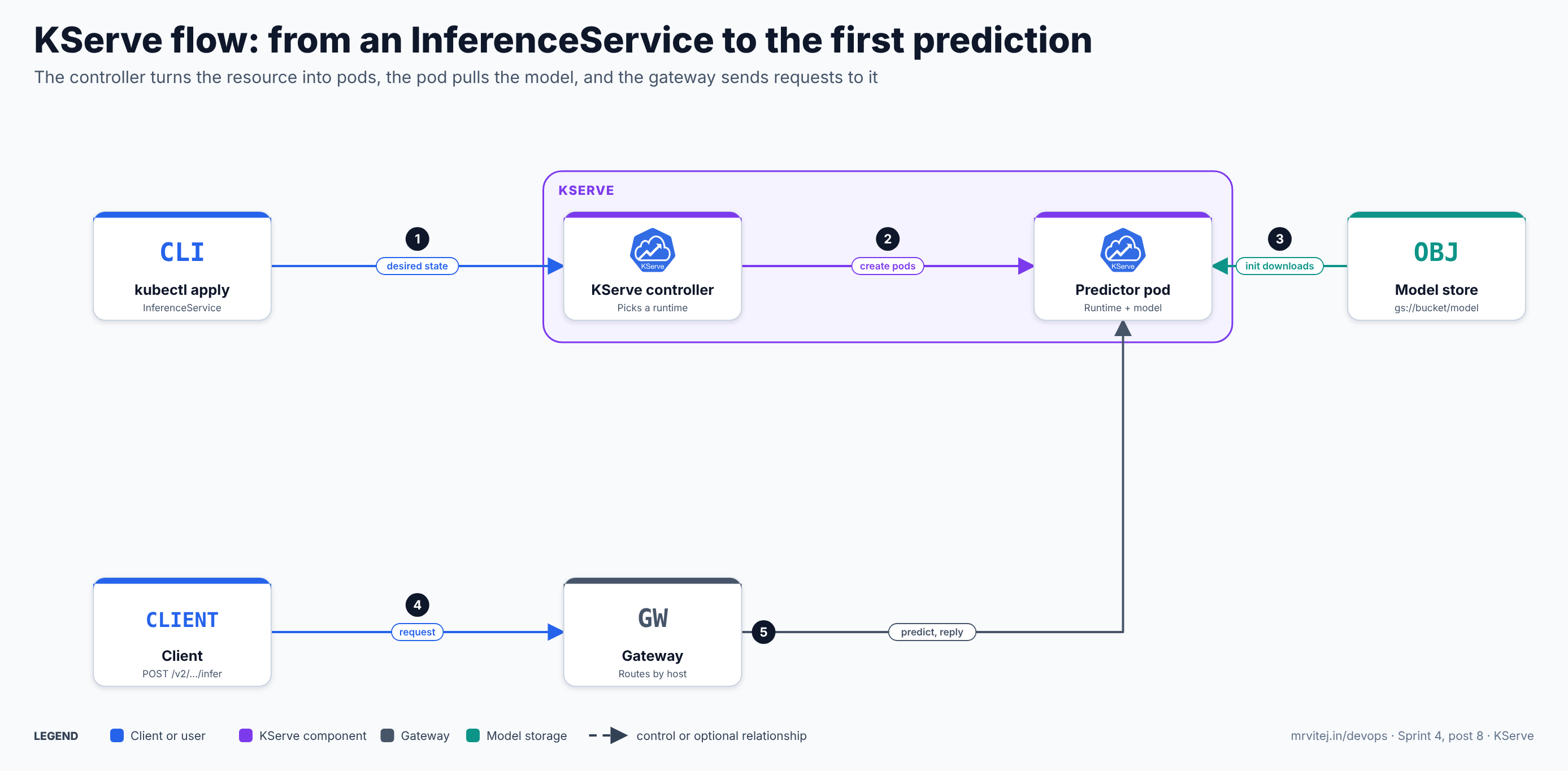
- Apply. You apply an InferenceService with
kubectlor a GitOps tool. The API server validates it through KServe’s admission webhook. - Reconcile. The controller picks a serving runtime that supports the model format, merges the runtime template with your overrides, and creates the Deployment or Knative Service, a Service and the route.
- Download. The pod’s storage initializer downloads the model files from
storageUriinto a shared volume. Only then does the model server start and load the model. - Request. A client sends an inference request to the gateway’s address for the service.
- Predict. The gateway routes it to the predictor (through the transformer if one exists), the runtime runs the model and the response goes back along the same path.
Recap: the resource says what to serve, the runtime knows how, and the gateway and autoscaler keep it reachable.
Two deployment modes
This choice shapes everything else, so it comes before the install.
- Knative mode (serverless) runs the predictor as a Knative Service. It brings request-based autoscaling through the Knative Pod Autoscaler, scale to zero and from zero, revisions and canary rollouts. It needs Knative Serving, a networking layer (Istio, Kourier or Contour) and cert-manager. The documentation recommends it mainly for predictive workloads, which have short response times and often run on CPUs.
- Standard mode runs plain Kubernetes Deployments with a Service and a route, scaled by the Kubernetes HPA or by KEDA. It needs no Knative, supports mounting several volumes (a Knative limitation), and is the mode the documentation recommends for generative workloads that need GPUs and have long request times. It does not scale to zero, and the canary rollout feature below is not available in it. Rolling updates use the normal Deployment strategy.
A useful rule: if you serve many small models that are idle most of the time and want canaries, Knative mode fits. If you want fewer moving parts, GPU workloads or Gateway API networking, use Standard mode.
Install
You need Kubernetes 1.32 or newer, kubectl and helm. Pin a chart version; the examples use v0.21.0, the latest tag at the time of writing, while the documentation pages show earlier numbers in places, so confirm the current release first.
Standard mode with the Gateway API
Install cert-manager (KServe uses it for webhook certificates) and the Gateway API CRDs, plus a Gateway API implementation such as Envoy Gateway or Istio. Then:
helm install kserve-crd oci://ghcr.io/kserve/charts/kserve-crd \
  --version v0.21.0 --namespace kserve --create-namespace

helm install kserve oci://ghcr.io/kserve/charts/kserve-resources \
  --version v0.21.0 --namespace kserve \
  --set kserve.controller.deploymentMode=Standard \
  --set kserve.controller.gateway.ingressGateway.enableGatewayApi=true \
  --set kserve.controller.gateway.ingressGateway.kserveGateway=kserve/kserve-ingress-gateway
The kserve/kserve-ingress-gateway value names a Gateway object you create in the kserve namespace from your Gateway API class. If you prefer a classic Ingress, set kserve.controller.gateway.ingressGateway.className to your ingress class instead.
Knative mode
Install Knative Serving, a networking layer and cert-manager first, following the Knative documentation (the KServe page lists Istio 1.27 or 1.28 with Knative 1.19 or 1.20 as the recommended pairing for current Kubernetes versions, and cert-manager 1.15.0 or newer). Then install KServe; Knative is the default mode:
helm install kserve-crd oci://ghcr.io/kserve/charts/kserve-crd --version v0.21.0
helm install kserve oci://ghcr.io/kserve/charts/kserve-resources --version v0.21.0
If you install from release YAML instead, use kubectl apply --server-side; the InferenceService CRD is too large for a client-side apply.
Install the serving runtimes
The built-in ClusterServingRuntimes are a separate step: with YAML it is the kserve-cluster-resources.yaml file of the release, and with Helm it is the kserve-runtime-configs chart. Check the chart README of your version for its exact value names. Then verify:
kubectl get pods -n kserve
kubectl get clusterservingruntimes
The list includes runtimes for scikit-learn, XGBoost, LightGBM, PMML, Paddle, TensorFlow Serving, Triton, TorchServe, OpenVINO, MLServer, Hugging Face and vLLM, plus a combined predictive runtime and a few newer ones.
A real InferenceService: scikit-learn from Google Cloud Storage
This example serves a small scikit-learn classifier from a GCS bucket on GKE. It uses no private data: the model is trained on the public iris dataset.
Train and upload the model
# train.py
import joblib
from sklearn.datasets import load_iris
from sklearn.linear_model import LogisticRegression

X, y = load_iris(return_X_y=True)
model = LogisticRegression(max_iter=500).fit(X, y)
joblib.dump(model, "model.joblib")
python train.py
gcloud storage cp model.joblib gs://example-models/iris/1/model.joblibThe scikit-learn server loads a single file with a .joblib, .pkl or .pickle extension from the model directory, so storageUri points at the folder, not the file.
Give the pod read access
On GKE, the usual pattern is a Kubernetes ServiceAccount linked to a Google service account through Workload Identity Federation, with roles/storage.objectViewer on the bucket. KServe lets an InferenceService name the ServiceAccount to use:
apiVersion: v1
kind: ServiceAccount
metadata:
  name: model-reader
  namespace: serving
  annotations:
    iam.gke.io/gcp-service-account: model-reader@example-project.iam.gserviceaccount.com
Treat the exact credential path as something to verify in the storage section of the KServe documentation for your version: KServe also supports credentials stored in a Secret referenced from the ServiceAccount. Prefer keyless access where it works.
Define the InferenceService
apiVersion: serving.kserve.io/v1beta1
kind: InferenceService
metadata:
  name: iris
  namespace: serving
spec:
  predictor:
    serviceAccountName: model-reader
    minReplicas: 1
    maxReplicas: 4
    model:
      modelFormat:
        name: sklearn
      protocolVersion: v2
      runtime: kserve-sklearnserver
      storageUri: gs://example-models/iris/1
      resources:
        requests: { cpu: 500m, memory: 512Mi }
        limits:   { cpu: "1",  memory: 1Gi }
kubectl create namespace serving
kubectl apply -f iris.yaml
kubectl get inferenceservice iris -n servingThe READY column turns True and a URL appears when the pod has downloaded the model and passed its readiness check. If it does not, kubectl describe inferenceservice iris -n serving and the logs of the storage-initializer container usually show a permissions or path problem.
Call it
SERVICE_HOSTNAME=$(kubectl get inferenceservice iris -n serving -o jsonpath='{.status.url}' | cut -d/ -f3)

curl -s -H "Host: ${SERVICE_HOSTNAME}" -H "Content-Type: application/json" \
  http://${INGRESS_HOST}:${INGRESS_PORT}/v2/models/iris/infer \
  -d '{"inputs":[{"name":"input-0","shape":[2,4],"datatype":"FP32",
        "data":[[6.8,2.8,4.8,1.4],[6.0,3.4,4.5,1.6]]}]}'
The response is a JSON object with model_name, outputs and the predicted classes. INGRESS_HOST and INGRESS_PORT are the address of your gateway; with a Gateway API gateway, you would typically route by host name and use the host name that the status URL shows. With protocol v1, the path would be /v1/models/iris:predict and the body {"instances": [[...]]}.
Other formats
The same resource shape serves other models by changing the format and runtime. For an ONNX model, use modelFormat: onnx with the kserve-tritonserver runtime (Triton also serves TensorFlow, PyTorch and TensorRT) and lay the files out in Triton’s model repository structure, with a numbered version folder. For a Hugging Face model, use modelFormat: huggingface and a storageUri of the form hf://org/model, which serves it through the Hugging Face runtime, with a vLLM-based variant for generative models and OpenAI-style endpoints. A custom model that no runtime covers can be served with your own container in the predictor, using the KServe Python SDK to implement the protocol.
The inference protocol
KServe defines the contract between callers and model servers, which is why runtimes are interchangeable.
| Version | Transport | Paths |
|---|---|---|
| v1 | REST | GET /v1/models, GET /v1/models/<name> for readiness, POST /v1/models/<name>:predict, POST /v1/models/<name>:explain |
| v2 (Open Inference Protocol) | REST and gRPC | POST /v2/models/<name>[/versions/<version>]/infer, plus GET /v2/health/live, GET /v2/health/ready and model metadata and readiness endpoints |
| OpenAI-compatible | REST | The Hugging Face and vLLM runtimes expose chat and completion style endpoints for generative models |
v2 adds server health and metadata endpoints, versioned model paths and gRPC, and it renames :predict to /infer. It does not currently have an explain endpoint. Triton, TensorFlow Serving and TorchServe implement compatible versions of it, which is the reason a request that works on one runtime usually works on another with the same model.
For gRPC with a Knative deployment, the container port must be named h2c; in Standard mode the name follows the pattern <protocol>[-<suffix>], such as grpc-port. Check the framework page for your runtime, because the port details differ.
Features, one by one
Serving runtimes and choosing between them
A runtime lists supportedModelFormats with a version, an autoSelect flag and a priority, plus protocolVersions. If two runtimes support the same format and both are auto-selectable, the higher priority wins. If a v2 request is wanted for scikit-learn and no runtime is named, the MLServer runtime is used. Set runtime: explicitly for production so a platform upgrade cannot change which server answers, and set runtimeVersion when you need a specific image tag. To add your own, create a ServingRuntime in a namespace or a ClusterServingRuntime for the cluster, with the container image, arguments and the formats it handles.
Transformers and explainers
A transformer is a container placed in front of the predictor, so pre-processing stays out of the model image and can be scaled and changed separately. Its calls go to the predictor over the same protocol. An explainer provides :explain for protocol v1 and uses libraries such as Alibi or Captum through KServe’s built-in options.
InferenceGraph
An InferenceGraph connects several InferenceServices into one endpoint. The node types are a sequence (output of one is input to the next), a splitter (traffic split by weight, useful for A/B tests of models), an ensemble (call several models and combine) and a switch (route by a condition on the request). Each node references an InferenceService by name.
apiVersion: serving.kserve.io/v1alpha1
kind: InferenceGraph
metadata:
  name: splitter-model
spec:
  nodes:
    root:
      routerType: Splitter
      steps:
        - serviceName: sklearn-iris
          weight: 20
        - serviceName: xgboost-iris
          weight: 80
Request and response logging
An InferenceService can send request and response payloads as CloudEvents to a URL, for audit or drift analysis, with logger: { mode: all, url: ... } under the predictor. The modes are all, request and response. If no URL is set, it falls back to the namespace’s Knative broker or a default in the controller ConfigMap. This is a best-effort pipe to your own sink, so treat it as telemetry and not as a tamper-proof record.
Request batching and the model cache
KServe includes an optional request batcher in the pod agent, which groups requests up to a size and wait time before calling the model. For large models, a local model cache resource can pre-download models to nodes so that new pods start without a fresh download, and OCI image sources (“modelcars”) let the model travel as a container image, which the Helm chart enables by default.
Generative workloads
For large language models, KServe offers two paths. A normal InferenceService with the Hugging Face or vLLM runtime is the simple one. The LLMInferenceService resource is the advanced one: it uses Gateway API and the Gateway API Inference Extension for routing that considers the key-value cache, supports separate prefill and decode pools and tensor, data and expert parallelism, and in v0.18 added multi-node inference without Ray. It requires a Standard mode setup with a Gateway API implementation and the LeaderWorkerSet operator for multi-node serving. The API is still v1alpha2, so expect change.
Autoscaling
The fields are on the component (predictor):
| Field | Meaning |
|---|---|
minReplicas / maxReplicas |
Bounds on the replica count. minReplicas: 0 is allowed in Knative mode |
scaleMetric |
The metric to follow: cpu and memory in all modes, concurrency and rps only through Knative |
scaleTarget |
The target value for that metric, such as 80 (percent) for CPU or 10 in-flight requests |
containerConcurrency |
A hard limit on concurrent requests per container |
timeout |
Seconds before a request to the component times out |
Knative mode. The Knative Pod Autoscaler counts concurrent requests or requests per second and scales replicas, including down to zero when idle and back up on the first request. The first request after a scale-to-zero waits for a pod to start, and for a model that must download from storage first, that cold start can take a long time, so keep minReplicas: 1 for latency-critical services or use a model cache.
Standard mode with HPA.
metadata:
  annotations:
    serving.kserve.io/deploymentMode: Standard
    serving.kserve.io/autoscalerClass: hpa
spec:
  predictor:
    minReplicas: 1
    maxReplicas: 5
    scaleMetric: cpu
    scaleTarget: 80
Standard mode with KEDA. Set serving.kserve.io/autoscalerClass: keda and describe the triggers under autoScaling.metrics, with type: Resource for CPU or memory or type: External for metrics from monitoring systems such as Prometheus (for example, the number of waiting requests on a vLLM server). KEDA needs to be installed, and the documentation lists the KEDA integration as Standard mode only.
Your own scaler. Set autoscalerClass: none to have KServe create no scaler at all, or external when another controller manages the HPA. The documentation recommends none when you disable autoscaling entirely.
Rolling out a new model version
Canary in Knative mode. Every change to the predictor creates a new revision. KServe remembers the last revision that took 100 percent of traffic. Set canaryTrafficPercent on the component, change storageUri to the new model, and apply; the new revision gets that share and the previous good one keeps the rest.
spec:
  predictor:
    canaryTrafficPercent: 10
    model:
      modelFormat:
        name: sklearn
      storageUri: gs://example-models/iris/2
To promote, remove the field and apply again, and the new revision takes 100 percent. To roll back, set canaryTrafficPercent: 0, which pins all traffic to the previous good revision. If the new revision is not ready, traffic is not routed to it. With the annotation serving.kserve.io/enable-tag-routing: "true", each revision also gets its own URL, so you can test the candidate directly before sending it any share of production traffic.
Rolling updates in Standard mode. Canary is not supported, so updates use the Kubernetes rolling strategy. KServe defaults to 25 percent maxSurge and 25 percent maxUnavailable, which you can override in the ConfigMap’s deploymentRolloutStrategy or per service with deploymentStrategy. For a no-downtime update, set maxUnavailable to 0. To get a canary-like pattern in Standard mode, run two InferenceServices and put an InferenceGraph splitter or your gateway’s weighted routing in front.
Configuration reference
| Where | Setting | Purpose |
|---|---|---|
| Helm | kserve.controller.deploymentMode |
Knative (the default) or Standard |
| Helm | kserve.controller.gateway.ingressGateway.enableGatewayApi, .kserveGateway, .className |
Gateway API gateway or Ingress class for Standard mode |
| Helm | kserve.storage.enableModelcar, kserve.storage.resources |
OCI model images and the storage initializer’s CPU and memory (default limit 1 CPU and 1Gi) |
| Helm | kserve.metricsaggregator.enablePrometheusScraping |
Turns on scraping annotations cluster-wide (default 'false') |
ConfigMap inferenceservice-config |
deploy, ingress, logger, storageInitializer and more |
Default mode, domain and URL templates, default logger URL, storage settings |
| ISVC annotation | serving.kserve.io/deploymentMode |
Per-service mode, Standard or Knative |
| ISVC annotation | serving.kserve.io/autoscalerClass |
hpa, keda, external or none |
| ISVC annotation | serving.kserve.io/enable-prometheus-scraping |
Adds the Prometheus scrape annotations to the pod |
| ISVC annotation | serving.kserve.io/enable-tag-routing |
Per-revision URLs for canaries (Knative mode) |
| ISVC annotation | serving.kserve.io/secretName |
Secret used for storage credentials |
predictor |
minReplicas, maxReplicas, scaleMetric, scaleTarget, containerConcurrency, timeout, canaryTrafficPercent |
Scaling, limits and rollout |
predictor.model |
modelFormat, runtime, runtimeVersion, protocolVersion, storageUri, resources, args, env |
What to serve, with which server and protocol |
predictor |
serviceAccountName, nodeSelector, tolerations, affinity |
Identity and scheduling (GPU node pools, for example) |
Treat this table as a map to the documentation, not a substitute: the Helm chart’s README lists the full values and they change between releases.
Security
- No built-in authentication on the inference endpoint. Authentication and authorisation come from the layer in front: the gateway, a service mesh with mutual TLS, an authenticating proxy or Google’s Identity-Aware Proxy (the repository includes a sample for it). Decide this before exposing a service outside the cluster. Keep services
ClusterIP-reachable only through your gateway, and use NetworkPolicies to limit who can reach the model pods. - Restrict who can create InferenceServices. An ISVC runs a container and downloads from a
storageUriyou choose. Anyone who can create one can run a runtime or custom container in that namespace and read whatever its ServiceAccount can read. Use RBAC, namespaces, admission policy and an allowlist of runtime images. - Least-privilege storage access. Give each ServiceAccount read-only access to the specific bucket or prefix it serves, preferably with keyless Workload Identity, and avoid long-lived keys in Secrets.
- Models are code. A pickled scikit-learn or PyTorch file can run code when loaded. Load only models from storage that your pipeline controls, with write access restricted and versions or checksums recorded.
- Hardened containers. The shipped runtimes run as non-root with privilege escalation disabled and all capabilities dropped, and the storage initializer does the same. Keep those settings in your own runtimes.
- Patch. Track the release notes and the project’s security policy; the controller, the webhook and the runtimes all run with real permissions in your cluster.
Monitoring and day-2 operations
Metrics. The KServe model servers expose Prometheus metrics, including request latency histograms for the pre-processing, prediction and post-processing stages. Enable scraping per service with the annotation serving.kserve.io/enable-prometheus-scraping: "true" (the runtimes set prometheus.kserve.io/port and prometheus.kserve.io/path, which for the scikit-learn runtime are 8080 and /metrics), or cluster-wide through the Helm value. In Knative mode, the Knative queue proxy adds its own request metrics, and the project’s monitoring material uses Grafana dashboards for Knative and for runtime latency. If you use the Prometheus Operator, add a ServiceMonitor or PodMonitor whose selector matches the pods’ serving.kserve.io/inferenceservice label, and mind the release label your Prometheus selects on.
What to watch.
- ISVC
Readycondition and the age of the latest revision. - Request rate, error rate and latency percentiles per service, the same signals you would use for any API.
- Replica counts against
maxReplicas: a service pinned at its maximum is under-provisioned. - Storage-initializer failures and pod restarts, which usually mean credentials, paths or memory limits.
- Cold-start time for services that scale to zero.
- Controller logs and webhook health in the
kservenamespace.
Drift and quality. KServe does not measure model quality. Send request and response logs to your own pipeline and compute drift and accuracy there; the repository’s samples show outlier and drift detection services as examples of this pattern.
Upgrades. Upgrade the CRD chart first and the resources chart next, read the release notes for deprecations (runtime images and API versions do change), and test a copy of a real ISVC in a staging namespace. Pin the runtime versions so that a controller upgrade does not change the server your model runs on.
Limits and sharp edges
- Two modes, two feature sets. Scale to zero and canary rollouts are Knative-only, while KEDA and Gateway API networking are Standard-only in the documentation. Plan the mode up front, because switching a live service later is a migration.
- Knative is a real dependency. Serverless mode adds Knative, a networking layer and their upgrades to your platform team’s list.
- Large CRD. Use server-side apply, and expect big objects in GitOps diffs.
- Cold starts. Scale to zero trades cost for first-request latency, and the model download makes it worse.
- Generative resources are still young.
LLMInferenceServiceisv1alpha2, and the multi-node and routing features are changing quickly between releases. - Version drift in documentation. The website has several versions, and examples in older pages show older chart versions. Confirm commands against the version you install.
- Protocol gaps. v2 has no explain endpoint, and gRPC needs the right container port name per mode.
- Not a platform for everything. It does not train models, version them or orchestrate pipelines, and a single model with a steady load may not need it.
Usage cases
- Many predictive models behind one pattern. A platform team serves dozens of scikit-learn, XGBoost and ONNX models with one resource shape, one protocol, one metrics model and one rollout process.
- Cost control for sporadic models. Knative mode scales idle CPU models to zero.
- LLM endpoints with an OpenAI-style API, on GPU nodes, using the Hugging Face or vLLM runtime or the LLMInferenceService.
- Model A/B tests and ensembles through an InferenceGraph.
- A shared inference layer for an organisation, with the Kubeflow, Argo or Tekton pipelines that produce models as the upstream side.
The Sprint 4 pharmaceutical plant project uses KServe to serve its predictive-maintenance model on Google Cloud, as the stage between a trained model and the alerts that other parts of the platform consume.
Version and project status
KServe is an incubating CNCF project with a roadmap that moved from predictive serving to a unified predictive and generative platform. The recent releases show the direction: v0.17 (March 2026) made LLMInferenceService production-ready, v0.18 (April 2026) added multi-node inference without Ray, the OpenAI Responses API route and a vLLM upgrade, and v0.19, v0.20 and v0.21 followed between June and September 2026 (read their release notes for the details). The repository’s own roadmap file is older, from 2024 and 2025, and lists graduating the core CRDs to v1, securing InferenceServices, improving the Python SDK and the InferenceGraph, so read it as direction and not as a schedule. Releases arrive roughly every one to two months, and the most recent maintenance line is the one that gets fixes.
Adoption
The CNCF announcement counts more than 30 adopting organisations, from vendors to end users, and the project keeps a public adopters page on its website that organisations add themselves to; it states that the list is a subset. Public sources name Bloomberg and IBM, both founders and early users, and NVIDIA, Cisco and Zillow among the organisations using it, while Red Hat is a major contributor and its project lead is a Red Hat engineer. Naver Search reported using KServe to modernise its AI serving and to handle day and night traffic differences. For anything beyond those names, read the adopters page itself, because I have not verified the individual entries.
Alternatives
| Solution | Model | Best suited to |
|---|---|---|
| KServe | Kubernetes custom resources, pluggable runtimes, standard protocol | Platform teams serving many models, predictive and generative, on Kubernetes |
| Seldon Core and MLServer | Kubernetes serving platform with a Python inference server | Teams already on the Seldon stack, with the v2 protocol in common |
| BentoML | Packages a model and its service code into a container | Developers who want to write the service in Python and ship an image, and can run it on KServe as a custom container |
| NVIDIA Triton Inference Server | A high-performance multi-framework server | GPU-heavy serving; also available as a KServe runtime |
| Ray Serve | Python serving library on a Ray cluster | Teams running Ray for compute who want serving next to it |
| vLLM or llm-d directly | A generative inference engine and its Kubernetes layer | LLM-only platforms; KServe’s LLMInferenceService builds on llm-d |
| Managed services such as Vertex AI online prediction | A cloud provider’s hosted endpoints | Teams that prefer not to operate Kubernetes serving |
| A Deployment with a small FastAPI app | Hand-written | One or two stable models, with no need for a platform |
Strengths and limitations
| Strengths | Limitations |
|---|---|
| One declarative resource per model, with runtime selection from the model format | Two deployment modes with different feature sets, and Knative is a heavy dependency |
| Standard inference protocol over REST and gRPC, so runtimes are interchangeable | No built-in authentication; security depends on the gateway, mesh and RBAC |
| Many ready runtimes, from scikit-learn to Triton, Hugging Face and vLLM | Canary and scale to zero exist only in Knative mode |
| Autoscaling by HPA, KEDA or Knative, with canary rollouts, graphs and logging | Cold starts and large model downloads need planning |
| CNCF incubating project with a wide contributor base and a growing generative path | LLM resources are alpha and change quickly, and documentation versions drift |
Recommendation
Adopt for Kubernetes platforms that serve several models and want one consistent way to deploy, scale, update and observe them. Start in Standard mode with a Gateway API gateway and the HPA, or in Knative mode if you need scale to zero and canaries for idle CPU models, and make that choice deliberately because it is hard to change later. Pin the chart and runtime versions, name the runtime in every InferenceService, give each service read-only storage access through Workload Identity, put authentication and network policy in front of every endpoint, and scrape the metrics from the first day. For a single model with steady traffic and no platform ambitions, a plain Deployment is simpler.
References: KServe documentation · Architecture and control plane · Kubernetes deployment (Standard mode) install · Knative mode install · Serving runtimes · Open Inference Protocol · Canary rollout · Standard mode rollout strategy · HPA autoscaling · KEDA autoscaling · KServe v0.18 release · KServe v0.17 release · CNCF announcement · Adopters · GitHub repository